Persisted Cypher queries
The Teamwork Graph API is available through Forge's Preview release phase.
Preview features are available to all users and receive the same level of support as generally available features. Schemas, fields, and behavior may still change before general availability (GA), and breaking changes are subject to a minimum 1-month deprecation notice, announced in the Teamwork Graph changelog.
To review the current limitations, see Limitations and considerations.
To share feedback or report an issue, visit the Atlassian developer community.
A persisted Cypher query is a query you register with Teamwork Graph once, ahead of time, and then execute by key at runtime. Your app never sends Cypher text on a live request — it sends a query key and a set of parameter values.
Use a persisted query when you need a traversal that the curated queries don't cover. Check the curated catalog first: it needs no registration step and returns typed, hydrated objects.
Registering the query up front is what makes a custom traversal supportable. Atlassian validates it once, tells you immediately if it won't work, and can cache its plan instead of parsing and planning unknown Cypher on every request.
Prerequisites
- An app to own the query. Queries are owned by an app, not by a user.
- Contributor access on that app. Only a contributor can register queries for it.
- A Cypher query. The traversal you want to register, using
$paramplaceholders for dynamic values.
How it works
There are two stages, and the first happens once per query:
- Submit. You register the Cypher text and get back a
queryKey. The query is then distributed to the regions that serve execution, which takes about a minute. - Execute. Your app calls the
customQueryfield on the Teamwork Graph GraphQL endpoint with that key, passing parameter values.
Submission is a setup-time operation. Register your queries when you build or install your app.
Step 1: Submit the query
There are two ways to register a Cypher query for execution.
The recommended way is through TWG Labs, a UI playground where you can validate and explore Cypher queries before submitting for registration. The "Saved queries" tab lists the queries already registered against your app.
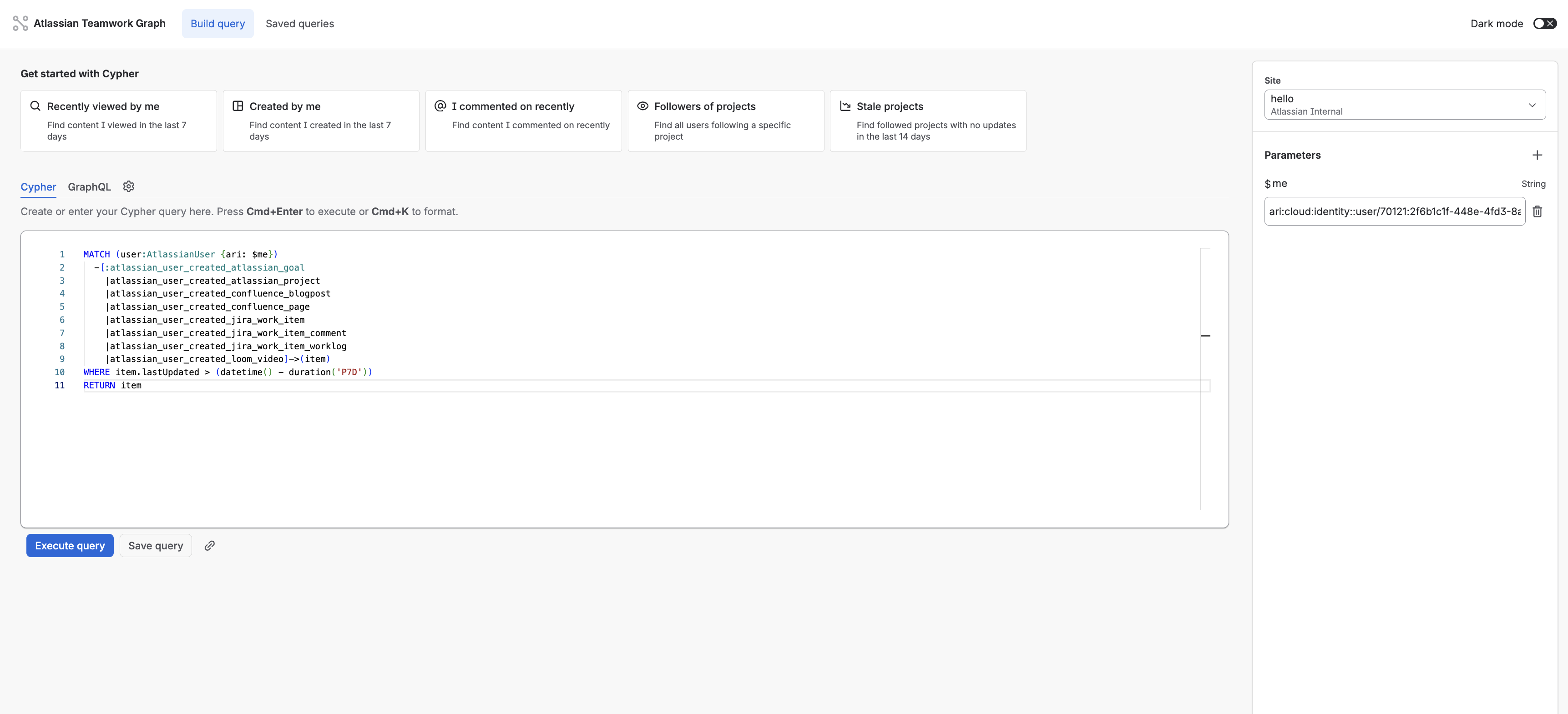
The second way is to submit the query to the Cypher query registration endpoint directly. Replace yourinstancename with your
site's name:
1
2
3POST https://yourinstancename.atlassian.net/gateway/api/twg/cypher-queries
Content-Type: application/json
1
2
3
4
5
6
7
8
9{
  "appId": "ari:cloud:ecosystem::app/your-app-id",
  "name": "assigned-work-items",
  "cypher": "MATCH (user:AtlassianUser {ari: $userId})-[:atlassian_user_assigned_jira_work_item]->(item:JiraWorkItem) RETURN item",
  "paramsSchema": [
    { "name": "userId", "type": "ARI", "required": true }
  ]
}
| Field | Required | Notes |
|---|---|---|
appId | Yes | The app that will own and execute the query |
name | Yes | A descriptive name for your own reference |
cypher | Yes | The query text, using $param placeholders for all values |
paramsSchema | No | Declares your parameters so the query can be validated |
Note: Cypher queries are saved against an app and only a contributor on the app identified by appId can submit a query for it.
On the execution side only the app its saved against can execute it.
Both routes produce the same queryKey.
Declaring parameters
paramsSchema is optional but recommended. Each entry takes a name, a required flag, and a
type of ARI, STRING, INTEGER, FLOAT, BOOLEAN, or JSON.
Its purpose is validation. Declaring your parameters lets Atlassian build representative values and check the query properly at submission time, so a query that would fail at runtime fails here instead. It isn't stored alongside the query and doesn't enforce types when you execute.
If you omit it, the query is still validated, but a query whose correctness depends on the shape of its parameters may pass submission and fail later.
Submission response
A new query returns 201 Created:
1
2
3
4
5
6
7{
  "queryKey": "b2c1a0f4-8e21-4c9a-9f0b-3d5e7a1c2b44",
  "version": 1,
  "contentHash": "9f2b...",
  "status": "active"
}
Store the queryKey. It's a UUID assigned at registration, and it's what your app uses to execute
the query. Keep it in your app's configuration alongside the code that calls it.
The contentHash is a SHA-256 of the Cypher text. You can compare it against a hash of the query you
hold locally to confirm the registered query is still the one you think it is.
Resubmitting is safe
Submitting the same Cypher text again for the same app isn't an error and doesn't create a duplicate.
You get 200 OK instead of 201 Created, with the original queryKey and the original registration
details.
This makes submission idempotent and safe to run from a setup script on every deploy.
Deduplication is based on the query text alone. Resubmitting identical Cypher under a different
name returns the original key and the original name, so name isn't a way to register two copies
of the same query.
Validation
Your Cypher is validated during submission, so syntax errors and references to object types, relationship types, or properties that don't exist are reported here rather than at runtime. The error message includes the line and column where possible. Fix the query and resubmit.
Wait for propagation
A newly submitted query isn't immediately executable. Distribution to the regions that serve execution is a background process that runs about once a minute, so allow roughly a minute between registering a query and depending on it.
If you execute too early you get QUERY_NOT_FOUND. That's the expected response inside the
propagation window and isn't a permanent failure — retry.
This only affects newly registered queries. Once a query has propagated it stays available.
Step 2: Execute the query
Execution happens on the same Teamwork Graph GraphQL endpoint you use for every other read, through
the customQuery field. Replace yourinstancename with your site's name:
1
2
3POST https://yourinstancename.atlassian.net/gateway/api/graphql/twg
Content-Type: application/json
customQuery takes your query key in place of the Cypher text that
cypherQuery would have taken:
1
2
3
4
5
6
7
8
9
10
11
12
13
14
15
16
17
18
19
20
21
22
23
24
25
26
27
28
29query companyName_assignedWork($queryKey: String!, $queryParams: CypherRequestParams) {
  customQuery(queryKey: $queryKey, queryParams: $queryParams, first: 25) {
    edges {
      node {
        columns {
          key
          value {
            __typename
            ... on CypherQueryResultNode {
              id
              data {
                __typename
                ... on JiraWorkItem {
                  key
                  summary
                }
              }
            }
          }
        }
      }
    }
    pageInfo {
      hasNextPage
      endCursor
    }
  }
}
Query variables:
1
2
3
4
5
6
7{
  "queryKey": "b2c1a0f4-8e21-4c9a-9f0b-3d5e7a1c2b44",
  "queryParams": {
    "userId": "ari:cloud:identity::user/712020:5fb4febcfacfd60076a1c699"
  }
}
| Argument | Required | Notes |
|---|---|---|
queryKey | Yes | The key returned when the query was submitted |
queryParams | Only if your query uses $param placeholders | Maps each placeholder in your Cypher to a value, without the $ prefix |
first | No | Page size. Defaults to 25 and must not exceed 25. |
after | No | Cursor from a previous response's pageInfo.endCursor |
Only the app that owns the query can execute it. The caller's app installation is resolved on every
request and checked against the appId the query was registered under, so a key belonging to another
app is rejected rather than executed.
Reading the response
customQuery returns a CypherQueryConnection, the same type
cypherQuery
returns. If you're migrating an existing raw Cypher call site, your response parsing doesn't change.
Each edge is one result row. Within a row, each column's key is the name from your RETURN clause,
so RETURN item produces a column keyed item.
Each column's value is a CypherQueryResultRowItemUnion, so you select the shape you expect with
an inline fragment:
CypherQueryResultNodefor a single object, carryingidand hydrateddata.CypherQueryResultListNodefor a list of objects, for example fromcollect(item).CypherQueryResultStringObject,CypherQueryResultIntObject,CypherQueryResultFloatObject,CypherQueryResultBooleanObject, andCypherQueryResultTimestampObjectfor scalars.CypherQueryResultPathObjectfor a path.
Select __typename alongside your fragments so your client can branch on what it actually received.
For a fuller walkthrough of these types, see
Handling different result types.
Paginate by passing pageInfo.endCursor as after on the next call, and keep going while
hasNextPage is true.
As with any Teamwork Graph read, a page can return fewer rows than you asked for and still have more
pages, because permission filtering happens after the page is fetched. Drive your loop from
hasNextPage.
Permissions
Rows are permission-filtered for the authenticated user, exactly as they are for curated queries. Registering a query doesn't grant access to anything — it only fixes which traversal runs. Two users executing the same key with the same parameters can get different results.
Updating and versioning
Registered queries are currently immutable. The query text is what identifies a query, so there's no "edit" operation.
To change a query, submit the new text. That returns a new queryKey, and you switch your app over
to it. Keep the old key working until your clients have moved, then stop calling it.
New registrations start at version 1. Execution always resolves the latest active version stored
for a key, so there's nothing to pin and nothing to bump in your app when you register a new query —
you move your app to the new key instead.
Error reference
Submission errors
Submission errors are returned as { "errors": [ { "code": ..., "message": ... } ] }.
| Code | HTTP | What to do |
|---|---|---|
INVALID_REQUEST | 400 | A required field is missing. The message lists which ones. |
INVALID_CYPHER | 400 | The query failed validation. The message includes the line and column where possible. |
UNIDENTIFIED_CALLER | 401 | The request carried no usable user identity. |
NOT_CONTRIBUTOR | 403 | The caller isn't a contributor on the app named in appId. |
NOT_FOUND | 404 | Persisted Cypher isn't enabled for this caller or environment. |
BAD_GATEWAY | 502 | The query couldn't be stored. Retry. |
VALIDATION_UNAVAILABLE | 503 | Validation is temporarily unavailable. Retry. |
Execution errors
Execution errors come back as standard GraphQL errors. The HTTP status is still 200, data.customQuery
is null, and the reason is in errors[].extensions.code:
1
2
3
4
5
6
7
8
9
10{
  "data": { "customQuery": null },
  "errors": [
    {
      "message": "No persisted Cypher query found for key b2c1a0f4-8e21-4c9a-9f0b-3d5e7a1c2b44",
      "extensions": { "code": "QUERY_NOT_FOUND" }
    }
  ]
}
| Code | What to do |
|---|---|
INVALID_REQUEST | queryKey was missing or blank, or first exceeded 25. |
QUERY_NOT_FOUND | Unknown key. If you just registered it, you're inside the propagation window — retry. |
QUERY_NOT_ACTIVE | The key exists but isn't active. |
QUERY_MALFORMED | The stored artifact couldn't be read as a query. Resubmit it. |
INSTALLATION_NOT_FOUND | No app installation could be resolved for the caller. |
NOT_OWNER | The calling app doesn't own this query key. |
FEATURE_UNAVAILABLE | Persisted Cypher execution isn't enabled for this caller or environment. |
STORAGE_UNAVAILABLE | The query couldn't be read. Retry. |
Frequently asked questions
Can I update a persisted query in place?
No. Submit the new text, which gives you a new key, then switch your app over to it.
Can I list the queries my app has registered?
The queries registered against your app are listed in TWG Labs. Keep the keys you depend on in your app's configuration too, so a deployment never has to look them up.
Do I need one persisted query per parameter combination?
No. Parameters are supplied at execution time, so one registered query covers every value of its parameters. You only need separate queries when the traversal itself differs — a different relationship type or a different object type.
Can I build the query text dynamically?
No. That's the point of persisting it. If your app previously concatenated Cypher, register one query per distinct traversal shape and choose between the keys in your own code.
Getting help
If a query you expect to be valid is rejected at submission, ask in the Atlassian developer community or raise a ticket in the Atlassian Ecosystem Help Center.
Rate this page: