Customer Service Management CRM import
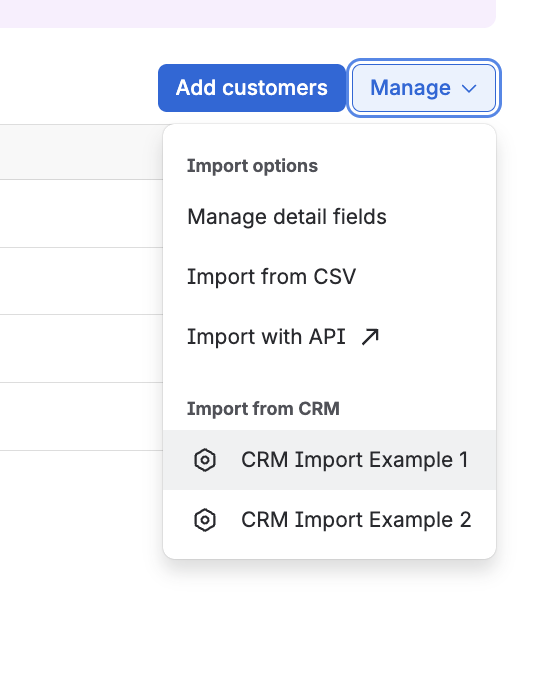
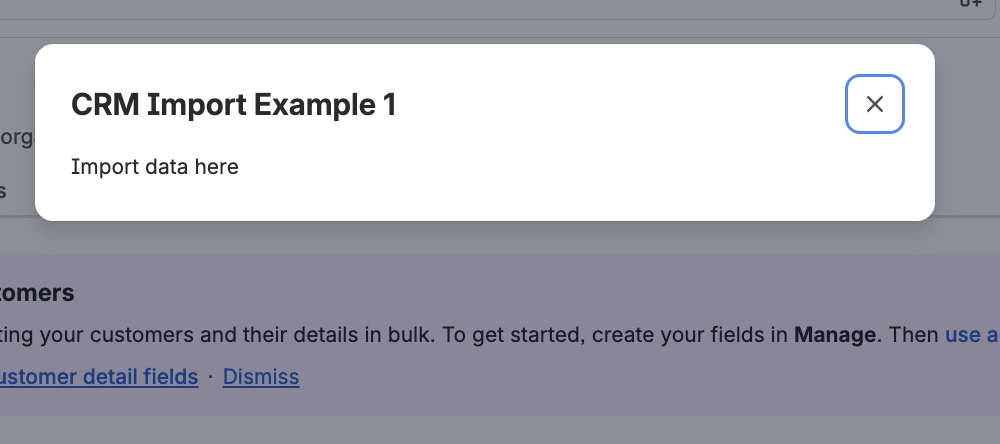
The customerServiceManagement:crmImport module adds an item under the Manage dropdown on the Customers, Organizations, and Products pages within the customer directory of the Customer Service Management (CSM) app. When the item is clicked, content is rendered inside a modal dialog. This module is intended for apps that import customer context data from external CRM systems (for example, HubSpot, Zendesk, or Salesforce) into Customer Service Management.
This module can be used in Customer Service Management.
For a high-level guide and pointers to product-specific integration patterns, see Import customer context data with a Forge app.
Properties
| Property | Type | Required | Description |
|---|---|---|---|
key |
| Yes |
A key for the module, which other modules can refer to. Must be unique within the manifest. Regex: |
resource | string | If using Custom UI or modern versions of UI Kit | The key of a static resources entry that your module will display. See resources for more details. |
render | 'native' | If using modern versions of UI Kit | Indicates the module uses UI Kit. |
resolver | { function: string } or{ endpoint: string } |
Set the Set the | |
title | string or i18n object | Yes |
The title of the modal, which is displayed at the top of the modal. The title also appears as an item under the Manage dropdown on the Customers, Organizations, and Products pages. The |
icon | string |
The icon displayed next to the For Custom UI and UI Kit apps, the If no icon is provided, or if there's an issue preventing the icon from loading, a generic app icon will be displayed. |
i18n object
| Key | Type | Required | Description |
|---|---|---|---|
i18n | string | Yes | A key referencing a translated string in the translation files. For more details, see Translations. |
Extension context
UI Kit and Custom UI
Use the useProductContext hook to access the extension context in UI Kit or getContext bridge method in Custom UI.
| Property | Type | Description |
|---|---|---|
type | string | The type of the module. |
location | string | The full URL of the host page where this module is displayed. |
Rate this page: