Customer Service Management request detail
The customerServiceManagement:requestDetail module adds a panel to the request details screen of a Customer Service Management support site. The content of the module is shown below the Conversation history section on the request details page.
This module can be used in Customer Service Management.
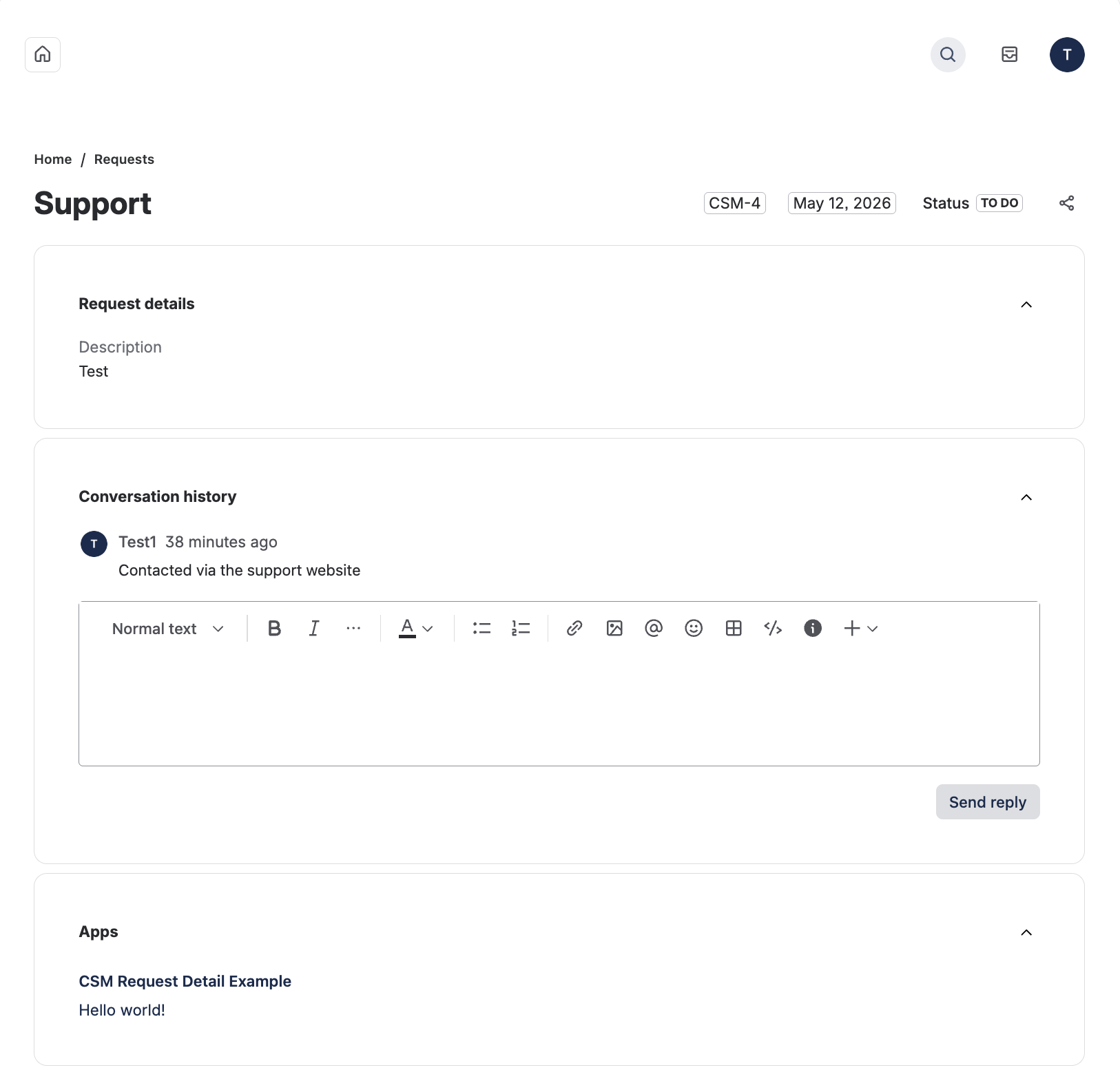
Properties
| Property | Type | Required | Description |
|---|---|---|---|
key |
| Yes |
A key for the module, which other modules can refer to. Must be unique within the manifest. Regex: |
resource | string | If using Custom UI or modern versions of UI Kit | The key of a static resources entry that your module will display. See resources for more details. |
render | 'native' | If using modern versions of UI Kit | Indicates the module uses UI Kit. |
resolver | { function: string } or{ endpoint: string } |
Set the Set the | |
viewportSize | 'small', 'medium', 'large' or 'xlarge' | The display size of resource. Can only be set if the module is using the
resource property. Remove this property to enable automatic resizing of the module. | |
title | string or i18n object | Yes |
The title of the request detail panel, which is displayed above the panel. The |
unlicensedAccess | List<string> | An array of unlicensed user types that can interact with the module. Supported values are customer and unlicensed. Anonymous access is not supported. | |
displayConditions | object | The object that defines whether or not a module is displayed in the UI of the app. See display conditions. |
i18n object
| Key | Type | Required | Description |
|---|---|---|---|
i18n | string | Yes | A key referencing a translated string in the translation files. For more details, see Translations. |
Extension context
UI Kit and Custom UI
Use the useProductContext hook to access the extension context in UI Kit or getContext bridge method in Custom UI.
| Property | Type | Description |
|---|---|---|
type | string | The type of the module. |
request.key | string | The key of the request where the module is rendered. |
helpCenter.id | string | The id of the support site where the module is rendered. |
location | string | The full URL of the host page where this module is displayed. |
Unlicensed access
By default, this module is only visible to licensed Jira users. To make the module available to other user types on a Customer Service Management support site, opt in using the unlicensedAccess property in the manifest.yml file.
Supported user types
The customerServiceManagement:requestDetail module supports the following user types in unlicensedAccess:
| User type | Description |
|---|---|
customer | A user who is a member of the CSM Customers group (helpseeker) on the site. These users access the support site as helpseekers to submit and view their own requests, and do not have agent or admin access to CSM spaces. They are added to the CSM Customers group when they interact with the support site. |
unlicensed | A user who is logged in to their Atlassian account and has a Customer Service Management product license with the Customer role (as opposed to the User/agent role). These are CSM customers who sign in using an Atlassian account with the customer role. |
The anonymous user type is not supported by this module. Anonymous users cannot reach the request detail page in a Customer Service Management support site, so anonymous access is not applicable.
Users who have a Jira Service Management license but no Customer Service Management license cannot access the CSM support site request detail page, and therefore never see this module regardless of the unlicensedAccess configuration.
How to opt in
To allow unlicensed users to see the module, add the unlicensedAccess property to the module declaration in your manifest.yml. The property expects an array of user types.
1
2
3
4
5
6
7
8
9
10
11modules:
  customerServiceManagement:requestDetail:
    - key: hello-world-panel
      resource: main
      resolver:
        function: resolver
      title: My request panel
      unlicensedAccess:
        - customer
        - unlicensed
App visibility by configuration and user type
The following table shows whether the module is visible for each combination of unlicensedAccess value and user type.
| User type | unlicensedAccess not declared | unlicensedAccess: [] | unlicensedAccess: [customer] | unlicensedAccess: [unlicensed] | unlicensedAccess: [customer, unlicensed] |
|---|---|---|---|---|---|
| CSM licensed user (agent or admin with access to the request) | Yes | Yes | Yes | Yes | Yes |
customer (member of the CSM Customers group / helpseeker) | No | No | Yes | No | Yes |
unlicensed (CSM product license with Customer role in User Management) | No | No | No | Yes | Yes |
| JSM-only user (agent or customer with no CSM license) | N/A — cannot access the CSM support site request detail page | ||||
In summary:
- When
unlicensedAccessis omitted or set to an empty array, the module is hidden from all non-agent user types and only CSM licensed agents and admins see it. - Each user type listed in
unlicensedAccessis allowed independently. Unlisted types remain hidden. - CSM licensed agents and admins with permission to view the request always see the module, regardless of the
unlicensedAccessvalue. - Users who only have a JSM license cannot access the CSM support site request detail page at all, so
unlicensedAccessdoes not apply to them.
Caching
Atlassian apps may cache invocation responses for up to five minutes, so wait five minutes before attempting to validate an opt-in change using the app's user interface.
Authenticated Atlassian app API calls
Unlicensed users won't be able to make asUser API calls because the user is unauthorized and won't have access to the Customer Service Management space. However, apps with the necessary permissions will be able to make asApp API calls.
| Authenticated Atlassian app API calls | Unlicensed access |
|---|---|
asUser | Not allowed |
asApp | Allowed |
Rate this page: