Rovo Agent Connector
The rovo:agentConnector module allows you to integrate remote AI agents hosted on external infrastructure into Jira. Once a remote agent is registered, users can interact with them in a similar manner to other users and Rovo agents: assigning them work items, @mentioning them in comments, and chatting with them via the Rovo Chat panel.
Use this module to integrate Jira with AI agents residing outside of the Atlassian platform (such as GitHub Copilot, Cursor Background Agents, or Box AI Agents). Integrations must use A2A 1.0. For implementation guidance, see Integrate remote agents with Jira.
Requirement: Agent2Agent protocol server
Remote agents must implement an Agent2Agent (A2A) protocol server to communicate with Jira. The A2A protocol is an open standard that enables AI agents to communicate with each other, regardless of the underlying framework or vendor.
Atlassian supports both the synchronous and the streaming implementation of the A2A protocol. To enable streaming, set the streaming property to true in your manifest. Streaming in A2A 1.0 uses the A2A 1.0 JSON-RPC method set and event payload model.
For more information, see Getting Started.
Jira communicates with remote agents via the JSON-RPC 2.0 protocol. Your remote service must expose an endpoint that accepts JSON-RPC requests from Jira and returns responses according to the A2A protocol specification.
Timeouts
| Transport Type | Timeout |
|---|---|
streaming=false (sync invocation) | 55s |
streaming=true (SSE stream) | 900s (15min) |
Note that in case of timeouts during the streaming requests, Jira will attempt to reconnect automatically to the remote agent.
We also have different timeout behaviours depending on the trigger of the agent interaction:
| Agent Trigger | Timeout |
|---|---|
| Chat interaction | 30 min |
| Work item | 60 min |
System User implications
Adding a rovo:agentConnector to a Forge app leads to modifying the behavior of the system user associated with the Forge app:
The app system user will no longer be mentionable.
This means that users won't be able to @-mention the app in comments or fields. This change affects all app versions in the current environment.
Instead, the agent connector user is available for @-mention.
The Forge CLI warns about this behavior change at deployment time and asks you to approve before proceeding.
This warning feature requires the Forge CLI version 13.3 or higher. For more details about the deployment approval flow, refer to deploy.
Limitations
Non-production apps might fail during the invocation if the user triggering the agent is not a contributor to the app.
This would reflect in the following error message:
1
2I couldn't finish working because of a technical problem on my end. Try again in a few moments.
If this is the case, you can fix it by adding the current user as an app contributor.
See also: more details about Forge app environments.
Manifest structure
1
2
3
4
5
6
7
8
9
10
11
12
13
14
15
16
17
18
19
20
21
22
23
24
25
26
27
28
29modules {}
└─ rovo:agentConnector []
   ├─ key (string) [Mandatory]
   ├─ name (string) [Mandatory]
   ├─ description (string) [Optional]
   ├─ icon (string) [Optional]
   ├─ conversationStarters [] [Optional]
   │  └─ conversationStarter (string)
   ├─ productContexts [] [Mandatory]
   │  └─ product (string)
   └─ protocols [] [Mandatory]
      └─ agent2Agent
         ├─ version (string) [Mandatory]
         └─ jsonRpcTransport
            ├─ streaming (boolean)
            └─ endpoint (string) [Mandatory]

remotes []
└─ key (string) [Mandatory]
└─ baseUrl (string) [Mandatory]

resources []
└─ key (string) [Mandatory]
└─ path (string) [Mandatory]

permissions []
└─ scopes []
  └─ scope (string) [Mandatory]
In this structure:
- The
rovo:agentConnectormodule defines a remote agent with metadata and communication protocols. - The
endpointproperty references a separately definedendpointmodule, which specifies the route Jira uses to communicate with your remote agent via JSON-RPC. - The
remotesconfiguration identifies the domain of your remote service and enables authentication tokens to be passed to your service. - The
resourcesmodule provides static assets like the agent icon. - The
productContextsproperty specifies which Atlassian products the agent operates in. Onlyjirais supported. - The
permissions.scopesarray declares the OAuth scopes your app requires. Theread:jira-workscope is required for the agent to function correctly.
Properties
| Property | Type | Required | Description |
|---|---|---|---|
key | string | Yes | A key for the module, which other modules can refer to. Must be unique within the manifest. Regex: ^[a-zA-Z0-9_-]+$ |
name | string | Yes | The name of your Agent. Must not exceed 30 characters. |
description | string | The description of your Agent. This is used to describe what your Agent can do to users. | |
icon | string | The icon displayed as the Agent’s avatar. The icon property accepts a relative path from a declared resource. Alternatively, you can also use an absolute URL to a self-hosted icon.If no icon is provided, or if there's an issue preventing the icon from loading, a generic avatar will be displayed. | |
conversationStarters | string[] | Conversation starters that will be suggested to the user when they engage with your Agent. | |
productContexts | string[] | Yes | The Atlassian apps within which the agent should operate. Only jira is currently supported. |
protocols | object | Yes | Defines the protocols and transport mechanisms your remote agent uses to communicate with Jira. See A2A Protocols for more configuration details |
A2A Protocols
| Property | Type | Required | Description |
|---|---|---|---|
agent2Agent | object | Yes | Configures communication using the Agent2Agent (A2A) protocol. Currently, only jsonRpcTransport is supported. |
agent2Agent.version | string | Yes | The version of the A2A protocol to use. The only valid value is 1.0.See A2A protocol versioning for more details. |
agent2Agent.jsonRpcTransport | object | Yes | Enables Agent2Agent protocol over JSON-RPC 2.0 transport. See Transport properties for more configuration details |
Transport properties
| Property | Type | Required | Description |
|---|---|---|---|
endpoint | string | Yes | The key of the endpoint that should be invoked for JSON-RPC communication with your remote agent. |
streaming | boolean | Whether responses from the remote agent are streamed back to Jira incrementally using Server-Sent Events (SSE). Defaults to false. |
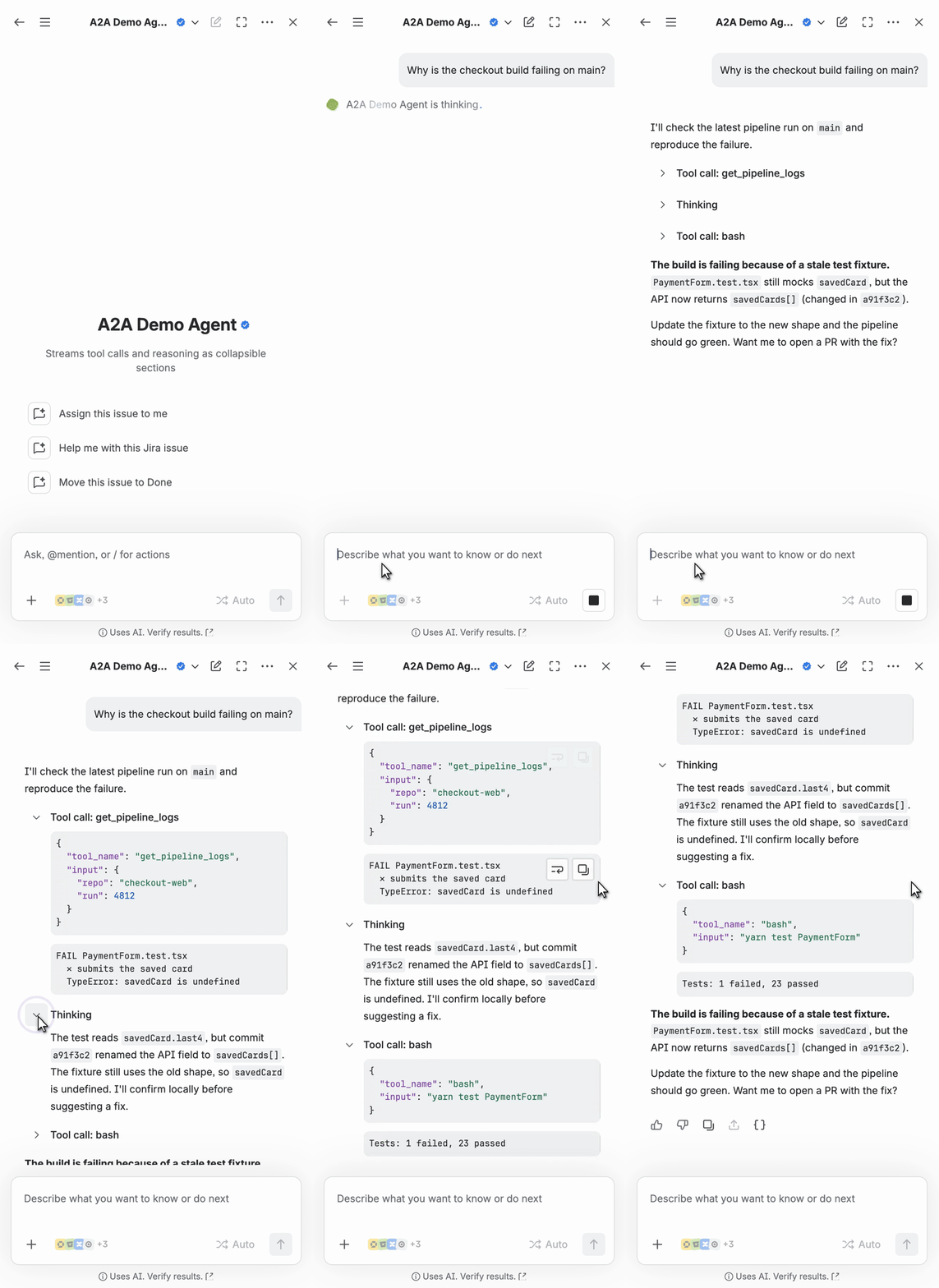
Collapsed sections in A2A streaming responses
In cases where the A2A agent needs to send back a long response, we recommend utilizing a collapsed section to hide verbose details and streamline the content presented to the user.
We support the Github markdown <details> block syntax as in Organizing information with collapsed sections, with the exception that we do not support <details open>.
Example:
1
2
3
4
5
6
7
8
9
10
11
12
13
14
15
16
17<details>

<summary>A summary that is immediately shown to the user</summary>

Some detailed content that will appear collapsed and can be expanded, such as tool call payloads or agent thinking messages.

You can use other markdown notations here too, such as code block.

    ```json
    {
      "tool_name": "bash",
      "input": "git pull origin main --no-rebase"
    }
    ```

</details>
Demo
An A2A agent streams a response with three collapsed sections (two tool calls and its thinking), followed by a normal answer. Each section expands when the user clicks the chevron.
Related manifest configurations
The rovo:agentConnector module works together with other manifest configurations to enable remote agent integration:
Manifest example
The following example manifest file defines an rovo:agentConnector that connects to your remotely hosted agent:
1
2
3
4
5
6
7
8
9
10
11
12
13
14
15
16
17
18
19
20
21
22
23
24
25
26
27
28
29
30
31
32
33modules:
  rovo:agentConnector:
    - key: your-awesome-agent
      name: Your Awesome Agent
      description: An awesome agent that you built
      icon: resource:agent-resources;icons/your-agent.svg
      productContexts:
        - jira
      protocols:
        agent2Agent:
          version: '1.0'
          jsonRpcTransport:
            endpoint: a2a-json-rpc-endpoint
            streaming: true
  endpoint:
    - key: a2a-json-rpc-endpoint
      remote: agent-remote
      route:
        path: /a2a/json-rpc
remotes:
  - key: agent-remote
    baseUrl: https://youragent.com
    operations:
      - fetch
      - compute
      - other
resources:
  - key: agent-resources
    path: static/hello-world/build
permissions:
  scopes:
    - read:jira-work
Tutorials and example apps
Rate this page: