Preload App Data
Available starting with these versions for Connect
- App cloud migration library 1.5.0
Available starting with these versions for Forge
- App cloud migration library 1.8.8
- Jira Cloud Migration Assistant 1.12.52
If your app migration has large down-time for customers consider preloading app data such as attachments before app migration. By implementing app data preloading, you allow customers to pre‑migrate their app data, significantly reducing downtime during their actual migration window.
Defining files to preload
Implement the com.atlassian.migration.app.preload.PreloadableApp interface by creating two methods.
isPreloadSupported should return true and getAppDataForPreload returns a list of AppDataDetails pointing to the location where the data is stored.
Putting this together an example implementation may look like:
1
2import com.atlassian.migration.app.preload.PreloadableApp;

public abstract class PreloadListener implements PreloadableApp {
    @Override
    public Boolean isPreloadSupported() {
        return true;
    }

    @Override
    public Stream<AppDataDetails> getAppDataForPreload(PreloadContext preloadContext, Optional<PreloadHeartbeat> preloadHeartbeat) {
        if(!(preloadContext instanceof JiraProjectPreloadContext)) {
            return Stream.empty();
        }
        JiraProjectPreloadContext jiraProjectPreloadContext = (JiraProjectPreloadContext) preloadContext;
        log.info("Generating preload data for project {}", jiraProjectPreloadContext.getProjectId());

        List<Path> files = myPreloadFileRetriever.retrieve(jiraProjectPreloadContext.getProjectId());

        return files.stream().map(file ->
              new AppDataDetails(
                      file.getFileName().toString(),
                      file.toAbsolutePath(),
                      null
              )
        );
    }
}
You can store metadata against a file which can later be accessed by your cloud app. One useful example is a checksum of the files contents to validate the data was not corrupted. You can use this information to surface to customers which files are corrupted and which projects to retry preload.
1
2@Override
public Stream<AppDataDetails> getAppDataForPreload(PreloadContext preloadContext, Optional<PreloadHeartbeat> preloadHeartbeat) {
...

    return files.stream().map(file ->
            new AppDataDetails(
                    file.getFileName().toString(),
                    file.toAbsolutePath(),
                    new Gson().toJson(PreloadedFileInfo.builder().sha256(Sha256.hash(file)).build())
            )
    );
}
Retrieving preloaded files
This should be done during the main app migration, rather than during the preload.
In your server app
There are two methods you can call inside your migration listener to check what files are preloaded.
To get all preloaded data for a given Jira project:
1
2int projectId = 10000;
JiraProjectPreloadContext context = new JiraProjectPreloadContext(projectId)
Stream<PreloadedAppDataDetails> data = gateway.getAllPreloadedAppData(context); // gateway is instance of AppCloudForgeMigrationGateway
To get preload data for a given file:
1
2Optional<PreloadedAppDataDetails> preloadedData = gateway.getPreloadedAppDataById("<fileId>"); // gateway is instance of AppCloudForgeMigrationGateway
Example data returned:
1
2[
    {
        "id": "fileId1.txt",
        "key": "92314841-56f0-4a13-a0c7-449fb522e4f0",
        "planId": "fa5bf021-8ba6-4adf-b007-3b58be40ac84",
        "failedReason": null,
        "expireAtInEpochMillis": 1771233914071
    },
    {
        "id": "fileId2.txt",
        "key": "81c258ca-7e21-40a9-82fe-42a8e9e59794",
        "planId": "fa5bf021-8ba6-4adf-b007-3b58be40ac84",
        "failedReason": null,
        "expireAtInEpochMillis": 1771233915610
    },
    ...
]
You can use these methods to skip exporting already preloaded files for a customer.
In your cloud app
A preloaded event is sent to your cloud app once all preload data has been uploaded. In this event you can use the key and the App data API to retrieve a manifest file which contains three columns fileId, key, info where fileId and info is what you specified in getAppDataForPreload in your server app and key is provided by Atlassian for you to retrieve the preloaded file using the App data API
Example contents:
1
2fileId1.txt,bddfbd8c-4a08-441d-8ab2-1ae6387df196,{"sha256":"e3b0c44298fc1c149afbf4c8996fb92427ae41e4649b934ca495991b7852b855"}
fileId2.txt,1a706490-8728-40f7-b3a6-3e828e24462e,{"sha256":"14a426a65679bef7f2705339b21e879357d8add36c5388468b169a0560f1a012"}
...
Running an app data preload
- Create a migration plan
- Select projects
- Select
Preloadable app data only - Run the migration
Once your app has implemented preloads an example migration looks like this:
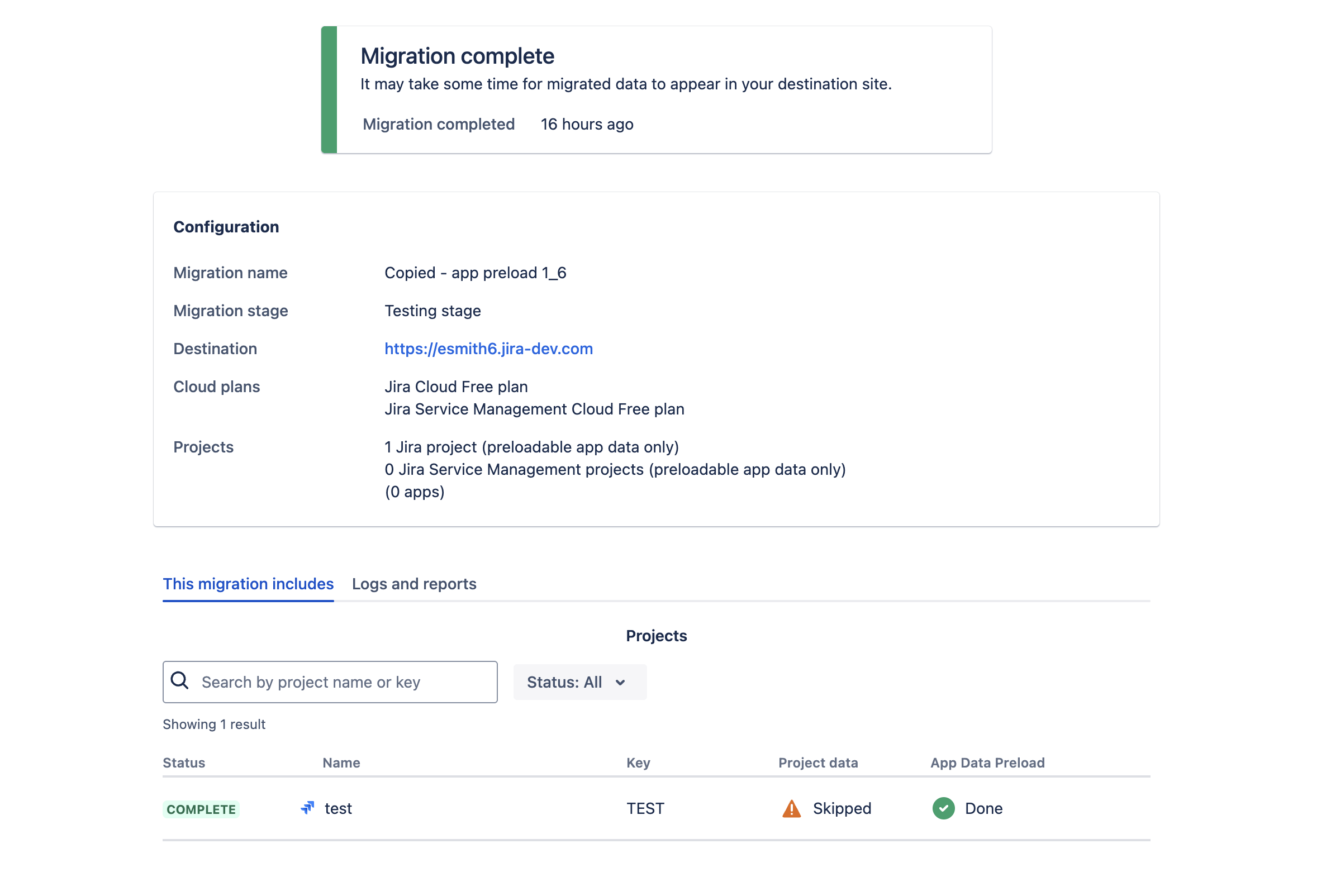
Limits
These are the current limits of the platform and are subject to change.
- Preloaded file expires after 28 days
- Max file size of 25GB
- Cloud app cannot signal to the server app to preload a specific file again
- App must be listed on marketplace
API
| Interface or Class | Method |
|---|---|
AppDataDetails | * |
PreloadHeartbeat | * |
PreloadContext | * |
JiraProjectPreloadContext | * |
AppCloudMigrationGateway | getPreloadedAppDataById |
AppCloudMigrationGateway | getAllPreloadedAppData |
PreloadableApp | getAppDataForPreload |
PreloadableApp | isPreloadSupported |
Rate this page: