Writing a gadget that shows days left in a version
Please note, this tutorial was written and tested to work with JIRA 4.0.1. Some practises used in this tutorial have changed and so some parts of the tutorial will not work with JIRA 6 and 7. If you'd like to try this tutorial out as is please try installing and running an older version of the Atlassian SDK (https://marketplace.atlassian.com/plugins/atlassian-plugin-sdk-windows/versions) such as version 4.2.x - you'll also need to make sure you have java 1.6 installed.
Level of experience: Beginner
Our tutorials are classified as 'beginner', 'intermediate' and 'advanced'. This one is at 'beginner' level, so you can follow it even if you have never developed a plugin or gadget before.
Overview
In this tutorial, we're going to create a new Atlassian gadget for JIRA, bundle it inside a plugin, use a REST resource to provide it with data, and have the gadget talk to the resource. This gadget will display the days left before a given version is scheduled to be released.
Your gadget will be a 'plugin' gadget. That means that it will be embedded within an Atlassian plugin. The plugin will consist of the following parts:
- Gadget spec file to hold the gadget's XML and JavaScript
- Java classes implementing the REST resource the gadget will use
- Plugin descriptor to enable the plugin module in JIRA
All these components will be contained within a single JAR file. Each component is further discussed in the examples below.
If you are interested, you can compare standalone gadgets and gadgets embedded in plugins.
Plugin Source
We encourage you to work through this tutorial. If you want to skip ahead or check your work when you are done, you can find the plugin source code on Atlassian Bitbucket. Bitbucket serves a public Git repository containing the tutorial's code. To clone the repository, issue the following command:
1
2$ git clone https://atlassian_tutorial@bitbucket.org/atlassian_tutorial/jira-days-left-in-version-gadget.git
Alternatively, you can download the source using the Downloads page here: https://bitbucket.org/atlassian_tutorial/jira-days-left-in-version-gadget
Step 1. Create the Plugin Project
Use the appropriate atlas-create-application-plugin command to create your plugin. For example, atlas-create-jira-plugin or atlas-create-confluence-plugin.
We'll be using the Atlassian Plugin SDK throughout the tutorial, so make sure you have it installed and working as described here. To check that you're ready to go, try the atlas-version command. You should see output like the following:
1
2
3
4
5
6
7
8
9
10
11
12
13ATLAS Version:    3.0.4
ATLAS Home:       /Users/tchan/Products/atlassian-plugin-sdk-3.0.4
ATLAS Scripts:    /Users/tchan/Products/atlassian-plugin-sdk-3.0.4/bin
ATLAS Maven Home: /Users/tchan/Products/atlassian-plugin-sdk-3.0.4/apache-maven
--------
Executing: /Users/tchan/Products/atlassian-plugin-sdk-3.0.4/apache-maven/bin/mvn --version
Apache Maven 2.1.0 (r755702; 2009-03-19 06:10:27+1100)
Java version: 1.6.0_15
Java home: /System/Library/Frameworks/JavaVM.framework/Versions/1.6.0/Home
Default locale: en_US, platform encoding: MacRoman
OS name: "mac os x" version: "10.6.2" arch: "x86_64" Family: "mac"
When prompted, create a JIRA plugin with the following specifications:
1
2
3
4
5Define value for groupId: : com.atlassian.plugins.tutorial
Define value for artifactId: : jira-gadget-tutorial.plugin
Define value for version:  1.0-SNAPSHOT: :
Define value for package:  com.atlassian.plugins.tutorial: :
Step 2. Add Plugin Name etc to Plugin descriptor
Edit the plugin descriptor at src/main/resources/atlassian-plugin.xml to give your plugin a unique key, name, description and vendor, as shown below.
Here is the atlassian-plugin.xml for your plugin:
1
2
3
4
5
6
7
8<atlassian-plugin key="${project.groupId}.${project.artifactId}" name="${project.artifactId}" plugins-version="2">
    <plugin-info>
        <description>${project.description}</description>
        <version>${project.version}</version>
        <vendor name="${project.organization.name}" url="${project.organization.url}" />
    </plugin-info>
</atlassian-plugin>
Step 3. Create the Gadget Spec
First we will create the gadget spec file. This is src/main/resources/days-left-gadget.xml:
1
2
3
4
5
6
7
8
9
10
11
12
13
14
15
16
17
18
19
20
21
22
23
24
25
26
27
28
29
30
31<?xml version="1.0" encoding="UTF-8" ?>
<Module>
    <ModulePrefs title="__MSG_gadget.days.left.title__"
                 directory_title="__MSG_gadget.days.left.title__"
                 description="__MSG_gadget.days.left.description__">
        <Require feature="dynamic-height"/>
        <Require feature="oauthpopup"/>
        <Require feature="setprefs"/>
        <Require feature="settitle"/>
        <Require feature="views"/>
        <Optional feature="atlassian.util"/>
        <Optional feature="gadget-directory">
            <Param name="categories">
                JIRA
            </Param>
        </Optional>
        #oauth
        #supportedLocales("gadget.common,gadget.days.left")
    </ModulePrefs>
    <UserPref name="isConfigured" datatype="hidden" default_value="false"/>
    <UserPref name="projectId" datatype="hidden"/>
    <UserPref name="version" datatype="hidden" default_value="auto"/>
    <Content type="html">
    <![CDATA[
       <!--We will be adding code here soon to create out gadget-->


  ]]>
  </Content>
</Module>
You should recognise the <ModulePrefs> section as the metadata container for the gadget: title, directory title, description and so on. The <Content> section contains the HTML and/or JavaScript that drive the gadget's behaviour. We have left it blank here while we look more closely at <ModulePrefs>.
Notice the <Optional> feature. This 'gadget-directory' feature specifies that the gadget is for JIRA and should be placed in the 'JIRA' category in the gadget directory browser. Without this, it is much harder to find and use gadgets from the directory browser.
Now we will add an internationalisation file under src/main/resources/i18n/i18n.properties:
1
2
3
4
5
6
7
8
9
10
11
12
13
14#days left in iteration gadget
gadget.days.left.title = Days Left
gadget.days.left.subtitle= Days Left: {0} - {1}
gadget.days.left.description=Displays the days remaining in specified project iteration
gadget.days.left.daysAgo = Days Ago
gadget.days.left.today = Today!
gadget.days.left.daysRemaining = Days Remaining
gadget.days.left.autoOption = Next Release Due (auto)
gadget.days.left.noReleaseDate = None
gadget.days.left.noVersionWarning = Selected project has no unreleased versions
gadget.days.left.noReleaseDatesWarning = Selected project has no versions with future release dates.
gadget.days.left.configTitle = Days Left
gadget.days.left.releaseDate= Release Date
Step 4. Customise the Plugin Descriptor and Maven POM
Now we need to edit the plugin descriptor at src/main/resources/atlassian-plugin.xml to give our plugin a unique key, and some meta information about this plugin.
A gadget is a module in atlassian-plugin.xml.
For our plugin, we will start with a module declaration for the gadget spec:
1
2<gadget  key="test" location="days-left-gadget.xml"/>
There are two required properties to note:
- key must be unique for all modules in this plugin.
- location is the path to the gadget spec file, relative to
src/main/resources.
Next add the <resource> element for the message bundle:
1
2<resource type="i18n" location="i18n/i18n" name="i18n" />
Next add the <rest> element for your rest resource:
1
2
3
4<rest key="tutorial-gadget-rest-resources" path="/tutorial-gadget" version="1.0">
    <description>Provides the REST resource for the project list.</description>
</rest>
Your atlassian-plugin.xml should now look as follows:
1
2
3
4
5
6
7
8
9
10
11
12
13
14
15
16
17
18
19
20
21
22
23
24
25<atlassian-plugin key="${project.groupId}.${project.artifactId}" name="${project.artifactId}" plugins-version="2">
    <plugin-info>
        <description>${project.description}</description>
        <version>${project.version}</version>
        <vendor name="${project.organization.name}" url="${project.organization.url}" />
    </plugin-info>

    <!--
        Registers the gadget spec as a plugin module. This allows the gadget to
        appear in the gadget directory and also allows administrators to
        disable/enable the gadget.
     -->
    <gadget  key="test" location="days-left-gadget.xml"/>

    <!-- Makes the gadget Locale messages available for the gadget's use. -->
    <resource type="i18n" location="i18n/i18n" name="i18n" />


    <!--Automatically finds all JAX-RS resource classes in the plugin andpublishes them.-->
    <rest key="tutorial-gadget-rest-resources" path="/tutorial-gadget" version="1.0">
        <description>Provides the REST resource for the project list.</description>
    </rest>

</atlassian-plugin>
Finally, to support the included REST module, update your pom.xml file so that it is identical to what is shown below:
1
2
3
4
5
6
7
8
9
10
11
12
13
14
15
16
17
18
19
20
21
22
23
24
25
26
27
28
29
30
31
32
33
34
35
36
37
38
39
40
41
42
43
44
45
46
47
48
49
50
51
52
53
54
55
56
57
58
59
60
61
62
63
64
65
66
67
68
69
70
71
72
73
74
75
76
77
78
79
80
81
82
83
84
85
86
87
88
89
90
91
92
93
94
95
96
97
98
99
100
101
102
103
104
105
106
107
108
109
110
111
112
113
114
115
116
117
118
119
120
121
122
123<?xml version="1.0" encoding="UTF-8"?>

<project xmlns="http://maven.apache.org/POM/4.0.0"
         xmlns:xsi="http://www.w3.org/2001/XMLSchema-instance"
         xsi:schemaLocation="http://maven.apache.org/POM/4.0.0 http://maven.apache.org/maven-v4_0_0.xsd">

    <modelVersion>4.0.0</modelVersion>
    <groupId>com.atlassian.plugin.tutorial</groupId>
    <artifactId>jira-gadget-tutorial-plugin</artifactId>
    <version>1.0-SNAPSHOT</version>

    <organization>
        <name>Example Company</name>
        <url>http://www.example.com/</url>
    </organization>

    <name>jira-gadget-tutorial-plugin</name>
    <description>This is the com.atlassian.plugin.tutorial:jira-gadget-tutorial-plugin plugin for Atlassian JIRA.</description>
    <packaging>atlassian-plugin</packaging>

    <dependencies>
          <dependency>
            <groupId>com.atlassian.gadgets</groupId>
            <artifactId>atlassian-gadgets-api</artifactId>
            <version>1.1.5.rc1</version>
        </dependency>
        <dependency>
            <groupId>com.atlassian.gadgets</groupId>
            <artifactId>atlassian-gadgets-spi</artifactId>
            <version>1.1.5.rc1</version>
        </dependency>
        <dependency>
            <groupId>com.atlassian.jira</groupId>
            <artifactId>atlassian-jira</artifactId>
            <version>${jira.version}</version>
            <scope>provided</scope>
        </dependency>
        <dependency>
            <groupId>junit</groupId>
            <artifactId>junit</artifactId>
            <version>4.6</version>
            <scope>test</scope>
        </dependency>
        <dependency>
            <groupId>com.atlassian.jira</groupId>
            <artifactId>jira-func-tests</artifactId>
            <version>${jira.version}</version>
            <scope>test</scope>
        </dependency>
        <dependency>
            <groupId>javax.ws.rs</groupId>
            <artifactId>jsr311-api</artifactId>
            <version>1.1</version>
            <scope>provided</scope>
        </dependency>
        <dependency>
            <groupId>com.atlassian.plugins.rest</groupId>
            <artifactId>atlassian-rest-common</artifactId>
            <version>1.1.0.beta6</version>
            <type>jar</type>
        </dependency>
       <dependency>
            <groupId>com.atlassian.jira</groupId>
            <artifactId>jira-rest-plugin</artifactId>
            <version>${jira.version}</version>
            <scope>provided</scope>
        </dependency>
        <dependency>
            <groupId>javax.xml.bind</groupId>
            <artifactId>jaxb-api</artifactId>
            <version>2.1</version>
            <scope>provided</scope>
        </dependency>
        <dependency>
            <groupId>com.atlassian.plugins.rest</groupId>
            <artifactId>atlassian-rest-common</artifactId>
            <version>1.0.2</version>
            <scope>provided</scope>
        </dependency>
        <dependency>
            <groupId>javax.servlet</groupId>
            <artifactId>servlet-api</artifactId>
            <version>2.3</version>
            <scope>provided</scope>
        </dependency>
        <dependency>
            <groupId>com.atlassian.sal</groupId>
            <artifactId>sal-api</artifactId>
            <version>2.1.beta4</version>
        </dependency>


    </dependencies>

    <build>
        <plugins>
            <plugin>
                <groupId>com.atlassian.maven.plugins</groupId>
                <artifactId>maven-jira-plugin</artifactId>
                <version>3.0.4</version>
                <extensions>true</extensions>
                <configuration>
                    <productVersion>${jira.version}</productVersion>
                    <productDataVersion>${jira.data.version}</productDataVersion>
                </configuration>
            </plugin>
            <plugin>
                <artifactId>maven-compiler-plugin</artifactId>
                <configuration>
                    <source>1.5</source>
                    <target>1.5</target>
                </configuration>
            </plugin>
        </plugins>
    </build>

    <properties>
        <jira.version>4.0.1</jira.version>
        <jira.data.version>4.0</jira.data.version>
    </properties>

</project>
Follow these steps to build and install your plugin, so that you can test your code. If you have not already started the application, start it now:
- Open a command window and go to the plugin root folder (where the
pom.xmlis located). - Run
atlas-run(oratlas-debugif you might want to launch the debugger in your IDE).
From this point onwards, you can use QuickReload to reinstall your plugin behind the scenes as you work, simply by rebuilding your plugin.
FastDev and atlas-cli have been deprecated. Please use Automatic Plugin Reinstallation with QuickReload instead.
To trigger the reinstallation of your plugin:
- Make the changes to your plugin module.
- Open the Developer Toolbar.
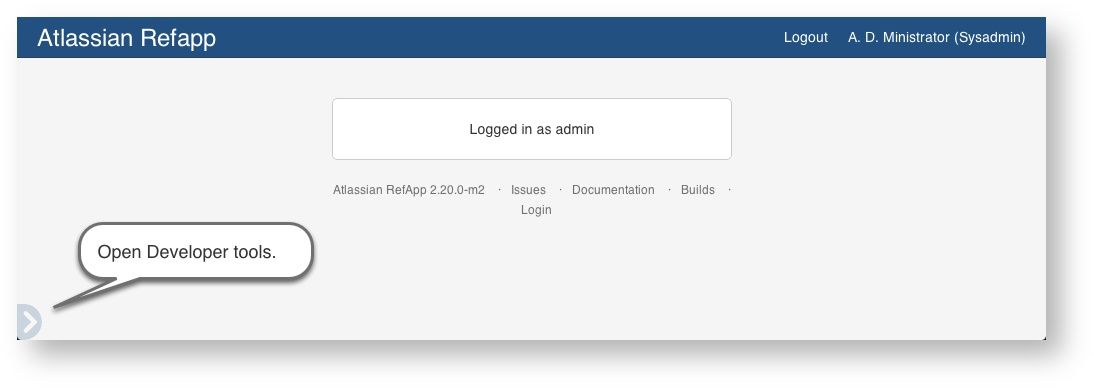
- Press the FastDev icon.
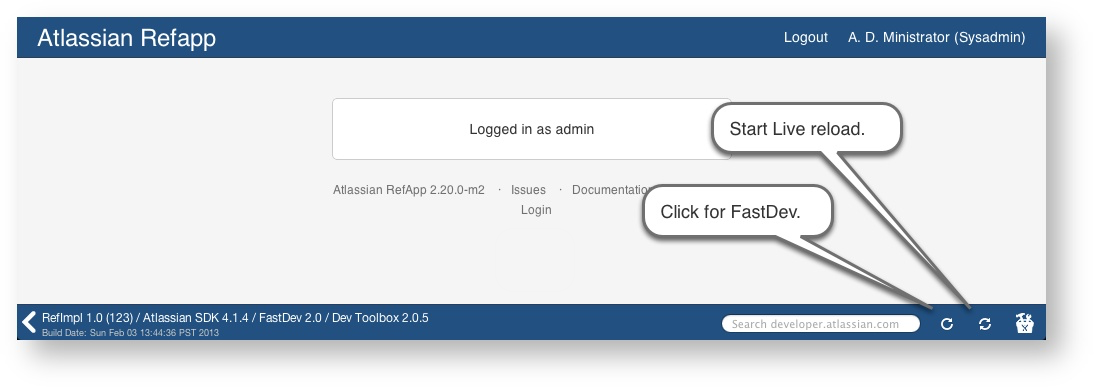
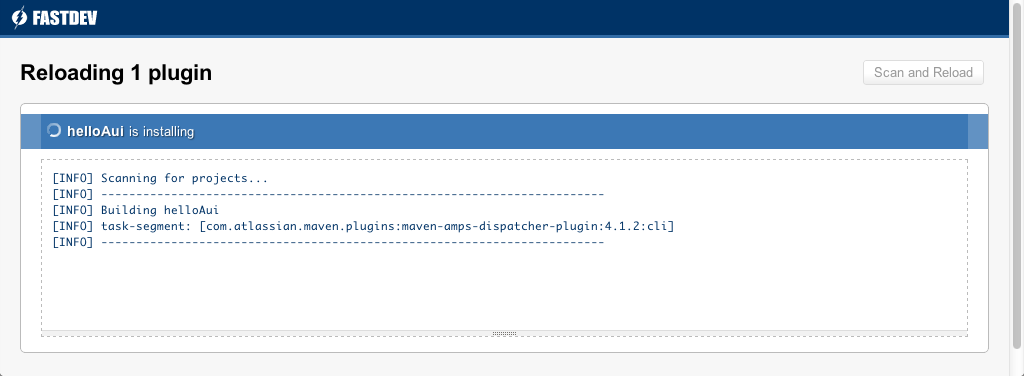
The system rebuilds and reloads your plugin:
Use live reload to view real-time updates to templates and other resources:
- Open the Developer Toolbar.
- Press the live reload icon.
The icon starts to revolve indicating it is on. - Edit your project resources.
- Save your changes:
Back in the host application, your plugin displays any user visible changes you make.
Go back to the browser. The updated plugin has been installed into the application, and you can test your changes.
The full instructions are in the SDK guide.
Step 5. Make Resources Available to your Gadget
For this gadget we will need to write a REST resource which retrieves information about all the versions of the project which the user selects in the config mode of the gadget we are creating.
Create a new Java file called DaysLeftInVersionResource.java in the following location: /src/main/java/com/atlassian/plugin/tutorial
Your DaysLeftInVersionResource.java should be identical to the code below:
1
2
3
4
5
6
7
8
9
10
11
12
13
14
15
16
17
18
19
20
21
22
23
24
25
26
27
28
29
30
31
32
33
34
35
36
37
38
39
40
41
42
43
44
45
46
47
48
49
50
51
52
53
54
55
56
57
58
59
60
61
62
63
64
65
66
67
68
69
70
71
72
73
74
75
76
77
78
79
80
81
82
83
84
85
86
87
88
89
90
91
92
93
94
95
96
97
98
99
100
101
102
103
104
105
106
107
108
109
110
111
112
113
114
115
116
117
118
119
120
121
122
123
124
125
126
127
128
129
130
131
132
133
134
135
136
137
138
139
140
141
142
143
144
145
146
147
148
149
150
151
152
153
154
155
156
157
158
159
160
161
162
163
164
165
166
167
168
169
170
171
172
173
174
175
176
177
178
179
180
181
182
183
184
185
186
187
188
189
190
191
192
193
194
195
196
197
198
199
200
201
202
203
204
205
206
207
208
209
210
211
212
213
214
215
216
217
218
219
220
221
222
223
224
225
226
227
228
229
230
231
232
233
234
235
236
237
238
239
240
241
242
243
244
245
246
247
248
249
250
251
252
253
254
255
256
257
258
259
260
261
262
263
264
265
266
267
268
269
270
271
272
273
274
275
276
277
278
279
280
281
282
283
284
285
286
287
288
289
290
291
292
293
294
295
296
297
298
299
300
301
302
303
304
305
306
307
308
309
310
311
312
313
314
315
316package com.atlassian.plugin.tutorial;

import com.atlassian.jira.bc.issue.search.SearchService;
import com.atlassian.jira.project.Project;
import com.atlassian.jira.project.version.Version;
import com.atlassian.jira.project.version.VersionManager;
import com.atlassian.jira.security.JiraAuthenticationContext;
import com.atlassian.jira.util.velocity.VelocityRequestContextFactory;
import com.atlassian.jira.web.util.OutlookDate;
import com.atlassian.plugins.rest.common.security.AnonymousAllowed;
import org.apache.commons.lang.builder.EqualsBuilder;
import org.apache.commons.lang.builder.HashCodeBuilder;
import org.apache.commons.lang.builder.ToStringBuilder;
import org.apache.commons.lang.builder.ToStringStyle;

import java.util.ArrayList;
import java.util.Collection;
import java.util.Collections;
import java.util.Comparator;
import java.util.Date;
import java.util.List;
import javax.ws.rs.GET;
import javax.ws.rs.Path;
import javax.ws.rs.Produces;
import javax.ws.rs.QueryParam;
import javax.ws.rs.core.MediaType;
import javax.ws.rs.core.Response;
import javax.xml.bind.annotation.XmlElement;
import javax.xml.bind.annotation.XmlRootElement;

import static com.atlassian.jira.rest.v1.util.CacheControl.NO_CACHE;

/**
 * REST endpoint for days left in iteration gadget.
 *
 * @since v4.0
 */
@Path ("/days-left-in-iteration")
@AnonymousAllowed
@Produces ({ MediaType.APPLICATION_JSON })
public class DaysLeftInVersionResource
{

    static final int MILLISECONDS_IN_SEC = 1000;
    static final int SECONDS_IN_MIN = 60;
    static final int MINUTES_IN_DAY = 60;
    static final int HOURS_IN_DAY = 24;
    private static final ToStringStyle TO_STRING_STYLE = ToStringStyle.SHORT_PREFIX_STYLE;

    private final VersionManager versionManager;
    private final JiraAuthenticationContext authenticationContext;
    private final SearchService searchService;
    private VelocityRequestContextFactory velocityRequestContextFactory;

    public DaysLeftInVersionResource(final SearchService searchService, final JiraAuthenticationContext authenticationContext, final VelocityRequestContextFactory velocityRequestContextFactory, final VersionManager versionManager)
    {
        this.searchService = searchService;
        this.authenticationContext = authenticationContext;
        this.velocityRequestContextFactory = velocityRequestContextFactory;
        this.versionManager = versionManager;
    }

    @GET
    @Path ("/getVersions")

    public Response getVersionsForProject(@QueryParam ("projectId") String projectIdString)
    {
        Long projectId = Long.valueOf(projectIdString.substring("project-".length()));
        List<Version> versions = getVersionList(projectId);

        final OutlookDate outlookDate = authenticationContext.getOutlookDate();
        long daysRemaining;
        List<VersionInfo> versionList = new ArrayList<VersionInfo>();

        String releaseDate;
        for (Version v : versions){
            releaseDate = formatDate(v.getReleaseDate());
            Project srcProj = v.getProjectObject();
            ProjectInfo targetProj = new ProjectInfo(srcProj.getId(), srcProj.getKey(), srcProj.getName());
            if(releaseDate == ""){
                daysRemaining = 0;
            }
            else {
                daysRemaining = calculateDaysLeftInVersion(v.getReleaseDate());
            }
            versionList.add(new VersionInfo(v.getId(),v.getName(), v.getDescription(),releaseDate,targetProj, daysRemaining));
        }


        return Response.ok(new VersionList(versionList)).cacheControl(NO_CACHE).build();

    }

    public static long calculateDaysLeftInVersion(Date targetDate){
        Date currentDate = new Date(System.currentTimeMillis());
        Date releaseDate = targetDate; //TO DO need to write convert string to date FUNCTION
        long currentTime = currentDate.getTime();
        long targetTime = releaseDate.getTime();

        long remainingTime = targetTime - currentTime;  //remaining time in milliseconds
        long hoursRemaining = remainingTime/(MILLISECONDS_IN_SEC* SECONDS_IN_MIN * MINUTES_IN_DAY);
        long daysRemaining = remainingTime/(MILLISECONDS_IN_SEC* SECONDS_IN_MIN * MINUTES_IN_DAY * HOURS_IN_DAY); //
        if(hoursRemaining % HOURS_IN_DAY > 0 ) {
            daysRemaining++; //the days remaining includes today should be updated for different time z
        }
        return daysRemaining;
    }

    public  String formatDate(Date date){
        if(date == null) {
            return "";
        } else {
            OutlookDate outlookDate = authenticationContext.getOutlookDate();
            return outlookDate.formatDMY(date);
        }
    }
    public List<Version> getVersionList(Long projectId)
    {
        List<Version> versions = new ArrayList<Version>();

        versions.addAll(versionManager.getVersionsUnreleased(projectId, false));

        Collections.sort(versions, new Comparator<Version>()
        {
            public int compare(Version v1, Version v2)
            {
                if(v1.getReleaseDate()== null)
                {
                    return 1;
                }
                else if (v2.getReleaseDate() == null)
                {
                    return 0;
                }
                else {
                    return v1.getReleaseDate().compareTo(v2.getReleaseDate());

                }
            }
        });
        return versions;
    }
    ///CLOVER:OFF


    /**
     * The data structure of the days left in iteration
     * <p/>
     * It contains the a collection of versionData about all the versions of a particular project
     */
    @XmlRootElement
    public static class VersionList
    {
        @XmlElement
        Collection<VersionInfo> versionsForProject;

        @SuppressWarnings ({ "UnusedDeclaration", "unused" })
        private VersionList()
        { }

        VersionList(final Collection<VersionInfo> versionsForProject)
        {
            this.versionsForProject = versionsForProject;
        }

        public Collection<VersionInfo> getVersionsForProject()
        {
            return versionsForProject;

        }

    }
    @XmlRootElement
    public static class ProjectInfo
    {

        @XmlElement
        private long id;

        @XmlElement
        private String key;

        @XmlElement
        private String name;

        @SuppressWarnings ({ "UnusedDeclaration", "unused" })
        private ProjectInfo()
        {}

        ProjectInfo(final long id, String key, String name)
        {
            this.id = id;
            this.key = key;
            this.name = name;
        }

        public long getId()
        {
            return id;
        }

        public String getKey()
        {
            return key;
        }

        public String getName()
        {
            return name;
        }

        @Override
        public int hashCode()
        {
            return HashCodeBuilder.reflectionHashCode(this);
        }

        @Override
        public boolean equals(final Object o)
        {
            return EqualsBuilder.reflectionEquals(this, o);
        }

        @Override
        public String toString()
        {
            return ToStringBuilder.reflectionToString(this, TO_STRING_STYLE);
        }
    }
    @XmlRootElement
    public static class VersionInfo
    {
        @XmlElement
        private long id;

        @XmlElement
        private String name;

        @XmlElement
        private String description;

        @XmlElement
        private String releaseDate;

        @XmlElement
        private long daysRemaining;

        @XmlElement
        private boolean isOverdue;

        @XmlElement
        private ProjectInfo owningProject;


        @SuppressWarnings ({ "UnusedDeclaration", "unused" })
        private VersionInfo()
        { }

        VersionInfo(final long id, final String name, final String description, final String releaseDate,  final ProjectInfo owningProject, final long daysRemaining)
        {
            this.id = id;
            this.name = name;
            this.description = description;
            this.releaseDate = releaseDate;
            this.isOverdue = isOverdue();
            this.owningProject = owningProject;
            this.daysRemaining = daysRemaining;


        }

        public long getId()
        {
            return id;
        }

        public String getName()
        {
            return name;
        }

        public String getDescription()
        {
            return description;
        }

        public String getReleaseDate()
        {
            return releaseDate;
        }

        public long getDaysRemaining()
        {
            return daysRemaining;
        }

        public boolean isOverdue ()
        {
            if (daysRemaining < 0 )
            {
                isOverdue = true;
            }
            else
            {
                isOverdue = false;
            }
            return isOverdue;
        }

        public ProjectInfo getOwningProject()
        {
            return owningProject;
        }
    }
}
To learn more about writing REST resources check out the tutorial on writing REST services.
Step 6. Add the Gadget to a Dashboard for Testing
If you haven't already done so, create a new dashboard to your JIRA instance.
Your gadget can already do something: It can say 'Hello world!'. Test it by adding it to JIRA. You will need a developer or test JIRA instance where you have administrative permission to add gadgets to that instance:
-
Go to a JIRA dashboard that you have created (or create a new one) and click 'Add Gadget'.
-
The 'Add Gadget' screen appears, showing the list of gadgets in your directory.
Your gadget should already appear in the list, because it is added as part of the plugin.
-
Click the 'Add it Now' button under your gadget to add the gadget to your dashboard.
At this stage you may wish to add two or three projects each containing a few versions in JIRA.
- To learn how to add new projects check out the video tutorial on adding projects.
- To learn how to add new versions to a project check out the documentation on managing versions.
Step 7. Create the Config Mode for the Gadget
We will now add some code in the Content section of our days-left-gadget.xml to create the config mode for our gadget.
Add the following code to the content section (inside the section labelled <[CDATA[DOCSPRINT: <! --Code For Step 7 goes here--> ]]>) of your days-left-gadget.xml file
1
2
3
4
5
6
7
8
9
10
11
12
13
14
15
16
17
18
19
20
21
22
23
24
25
26
27
28
29
30
31
32
33
34
35
36
37
38
39
40
41
42
43
44
45
46
47
48
49
50
51
52
53
54
55
56
57
58
59
60
61
62
63
64
65
66
67
68
69
70
71
72
73
74
75
76
77
78
79#requireResource("com.atlassian.jira.gadgets:jira-global")
#includeResources()

<script type="text/javascript">
     (function ()
     {

         var gadget = AJS.Gadget({
             baseUrl: "__ATLASSIAN_BASE_URL__",
             useOauth: "/rest/gadget/1.0/currentUser",
             config: {
                 descriptor: function(args)
                 {
                     var gadget = this;
                     gadgets.window.setTitle("__MSG_gadget.days.left.configTitle__");
                     var projectPicker = AJS.gadget.fields.projectPicker(gadget, "projectId", args.projectOptions);

                     return {

                         theme : function()
                         {
                             if (gadgets.window.getViewportDimensions().width < 450)
                             {
                                 return "gdt top-label";
                             }
                             else
                             {
                                 return "gdt";
                             }
                         }(),
                         fields: [
                             projectPicker,
                             AJS.gadget.fields.nowConfigured()
                         ]
                     };
                 },
                 args: function()
                 {
                     return [
                         {
                             key: "projectOptions",
                             ajaxOptions:  "/rest/gadget/1.0/filtersAndProjects?showFilters=false"

                         }


                     ];
                 }()
             },
             view: {
                 onResizeAdjustHeight: true,
                 enableReload: true,
                 template: function (args)
                 {
                 <!-- We will add code here in step 9 -->

                 },
                 args: [
                 {
                     key: "versions",
                     ajaxOptions: function ()
                     {
                         return {
                             url: "/rest/tutorial-gadget/1.0/days-left-in-iteration/getVersions",
                             data:  {
                                 projectId : gadgets.util.unescapeString(this.getPref("projectId")),
                             }
                         };
                     }
                 }
                 ]

             }
         });

     })();

 </script>
There a few important things to note:
The section below is an Ajax call which retrieves a list of the all your JIRA projects. This list will then appear as the options in the project select field.
1
2
3
4
5
6
7
8
9
10
11
12
13args: function()
    {
        return [
            {
                key: "projectOptions",
                ajaxOptions:  "/rest/gadget/1.0/filtersAndProjects?showFilters=false"

            }


        ];
    }()
This is the line which makes use of the JSON returned by the above Ajax call and creates the project select field.
1
2var projectPicker = AJS.gadget.fields.projectPicker(gadget, "projectId", args.projectOptions);
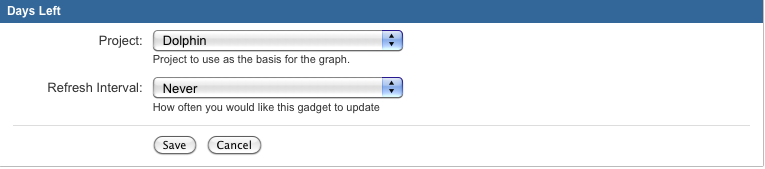
Your gadget should appear as follows on your dashboard:
Step 8. Adding some CSS to our Gadget
We will now add some CSS into our gadget. This will be used by in the view component of our gadget.
Add the following code to the content section of your gadget (days-left-gadget.xml) css code right after the line:
1
2#includeResources()
Here is the css code to include:
1
2
3
4
5
6
7
8
9
10
11
12
13
14
15
16
17
18
19
20
21
22
23
24
25
26
27
28
29
30
31
32
33
34
35
36
37
38
39
40
41
42
43
44
45
46
47
48
49<style type="text/css">
     #container {
         padding:15px;
     }
     #no-versions-warning {
         line-height: 1.4;
         font-size: 12px;
     }
     #days-box {
         text-align: center;
     }
     #days-value {
         text-align: center;
         font-size: 5em;
     }
     #days-text {
         padding-bottom: 15px;
     }
     #version-link {
         text-align: center;
     }
     #no-future-versions-warning {
         padding: 15px;
     }
     .view {
         padding:0.5em 1em;
     }
     .overdue {
         color: #cc0000;
     }
     .future-release {
         color: #00cc00;
     }
     .today {
         color: #cc0000;
     }
     #days-text .today {
         font-weight: bold;
     }

     .icon {
         padding-top: 3px;
         padding-right: 3px;
     }
     .disabled {
         color: #C0C0C0;
     }
 </style>
Step 9. Use Javascript to get the Versions into the Gadget
Now we will create the view component of our gadget.
Add the code below to your days-left-gadget.xml file inside the template: function (args){ } section
(In the place where there is a commment that says <!-- We will add code here in Step 9 -->)
1 2 3 4 5 6 7 8 9 10 11 12 13 14 15 16 17 18 19 20 21 22 23 24 25 26 27 28 29 30 31 32 33 34 35 36 37 38 39 40 41 42 43 44 45 46 47 48 49 50 51 52 53 54 55 56 57 58 59 60 61 62 63 64 65 66 67 68 69 70 71 72 73 74 75 76 77 78 79 80 81 82 83 84 85 86 87 88 89 90 91 92 93 94 95 96 97 98 99 100 101 102 103 104 105 106 107 108 109 110 111 112 113 114 115 116 117 118 119 120 121 122 123 124 125 126 127 128 129 130 131 132 133 134 135 136 137 138 139 140 141 142 143 144 145 146 147 148 149 150 151 152 153 154 155 156 157 158 159 160 161 162 163 164 165 166 167 168 169 170 171 172 173 174 175 176 177 178 179 180 181 182 183 184 185 186 187 188 189 190 191 192 193 194 195 196 197 198 199 200 201var versionData = args.versions; var currentVersion; var gadget = this; var baseUrl = AJS.$.ajaxSettings.baseUrl; var optionSelected = false; var projectVersionList; if (!versionData) { projectVersionList = null; } else { projectVersionList = AJS.$(args.versions.versionsForProject); } var getContainer = function() { var container = AJS.$("<div/>").attr('id', 'container').appendTo(gadget.getView().empty()); return function() { return container; } }(); var hasVersionWithReleaseDate = function(projectVersionList) { var hasReleaseDate = false; projectVersionList.each(function() { if (this.releaseDate != "") { hasReleaseDate = true; } }); return hasReleaseDate; }; var setTitle = function(projectVersionList) { if (!projectVersionList || !hasVersionWithReleaseDate(projectVersionList)) { gadgets.window.setTitle(gadget.getMsg("gadget.days.left.title")); } else { gadgets.window.setTitle(AJS.format("__MSG_gadget.days.left.subtitle__", currentVersion.owningProject.name, currentVersion.name)); } }; var versionSelector = function(projectVersionList) { var control = AJS.$("<select/>"); AJS.$("<option/>").attr({id:'next-release-option', value:'auto'}).text(gadget.getMsg('gadget.days.left.autoOption')).appendTo(control); projectVersionList.each(function() { var option = AJS.$("<option/>").attr({ value: this.id}); if (this.releaseDate == "") { option.attr("disabled", "true"); option.addClass('disabled'); option.append(this.name + ' - ' + gadget.getMsg('gadget.days.left.noReleaseDate')); } else { option.append(this.name + ' - ' + this.releaseDate); } if (this.id == gadget.getPref("version")) { option.attr({selected: "selected"}); currentVersion = this; optionSelected = true; } control.append(option); }); control.change(function(event) { gadget.savePref("version", AJS.$(this).val()); gadget.showView(true); }); //generate image on side of select bar AJS.$("#selection").append(AJS.$("<img/>").attr({ src: baseUrl + "/images/icons/box_16.gif", height: 16, width: 16, title: gadget.getMsg("gadget.roadmap.status.unreleased"), alt: gadget.getMsg("gadget.roadmap.status.unreleased"), class: "icon" })); AJS.$("#selection").append(control); //try auto select option if no option is selected if (!optionSelected) { AJS.$('#next-release-option').attr({selected: "selected"}); currentVersion = projectVersionList[0]; } }; var daysLeftDisplay = function(projectVersionList, container) { var projectLink = baseUrl + "/browse/" + currentVersion.owningProject.key var versionLink = projectLink + "/fixforversion/" + currentVersion.id container.append("<div id ='days-box'/>"); AJS.$("<div/>").attr("id", "days-value").appendTo("#days-box"); AJS.$("<div/>").attr("id", "days-text").appendTo("#days-box"); AJS.$("<div/>").attr("id", "version-link").appendTo("#days-box"); AJS.$("<a/>").attr({ href: projectLink, id:"projectLink"}) .appendTo('#version-link'); AJS.$("#version-link").append(" : "); AJS.$("<a/>").attr({ href: versionLink, id: "versionLink"}) .appendTo("#version-link"); if (hasVersionWithReleaseDate(projectVersionList)) { //if the currentVersion has no release date find the next version due AJS.$("<div/>").attr("id", "days-text").appendTo("#days-box"); AJS.$("<div/>").attr("id", "version-link").appendTo("#days-box"); AJS.$("#days-value").append(Math.abs(currentVersion.daysRemaining)); AJS.$('#projectLink').text(currentVersion.owningProject.name); AJS.$('#versionLink').text(currentVersion.name); AJS.$('<div/ >').attr('id', 'release-date').text(gadget.getMsg("gadget.days.left.releaseDate") + " : " + currentVersion.releaseDate).appendTo('#version-link') if (currentVersion.daysRemaining < 0) { AJS.$('#days-value').addClass('overdue'); AJS.$('#release-date').addClass('overdue'); AJS.$('#days-text').text(gadget.getMsg("gadget.days.left.daysAgo")) } else if (currentVersion.daysRemaining == 0) { AJS.$('#days-value').addClass('today'); AJS.$('#release-date').addClass('today'); AJS.$('#days-text').addClass('today').text(gadget.getMsg("gadget.days.left.today")) } else { AJS.$('#days-value').addClass('future-release'); AJS.$('#release-date').addClass('future-release'); AJS.$('#days-text').text(gadget.getMsg("gadget.days.left.daysRemaining")); } } else { AJS.$('#days-box').empty(); var futureVersionsWarning = AJS.$("<div />") .attr('id', 'no-future-versions-warning') .text(" - " + gadget.getMsg("gadget.days.left.noReleaseDatesWarning")) .appendTo('#days-box'); AJS.$("<a/>") .attr({ href: projectLink, id:"projectLink"}) .text(currentVersion.owningProject.name) .prependTo(futureVersionsWarning) } }; if (!projectVersionList) { var noVersionMsg = gadget.getMsg("gadget.days.left.noVersionWarning"); gadget.getView().empty().append((noVersionMsg)); } else { var container = getContainer().append("<div id='selection'/>"); versionSelector(projectVersionList); daysLeftDisplay(projectVersionList, container); setTitle(projectVersionList); } },
The <Content> element in your gadget specification contains the working parts of the gadget. The <Content> element consists of:
- A
CDATAdeclaration, to prevent the XML parser from attempting to parse the gadget content. Include '<![CDATA[GADGETDEV:' (without the quotes) at the beginning and ']]>' (without the quotes) at the end of your<Content>element. - Optional static HTML. When a dashboard renders the gadget, it will render this HTML.
- Optional JavaScript. You can declare JavaScript functions and call them in the usual way. Refer to the OpenSocial JavaScript API for details of gadget-specific API functions that any OpenSocial gadget container should support.
- Optional CSS style sheets.
Because your gadget is embedded in a plugin, you can use the Atlassian Gadgets JavaScript Framework in addition to the OpenSocial JavaScript API.
There are a few important things to note:
The versionSelector function (shown below) creates the drop down of all the unreleased versions for a specified project:
1
2
3
4
5
6
7
8
9
10
11
12
13
14
15
16
17
18
19
20
21
22
23
24
25
26
27
28
29
30
31
32
33
34
35
36
37
38
39
40
41
42
43
44
45
46
47
48
49
50
51var versionSelector = function(projectVersionList)
{
    var control = AJS.$("<select/>");
    AJS.$("<option/>").attr({id:'next-release-option', value:'auto'}).text(gadget.getMsg('gadget.days.left.autoOption')).appendTo(control);

    projectVersionList.each(function()
    {
        var option = AJS.$("<option/>").attr({ value:  this.id});
        if (this.releaseDate == "")
        {
            option.attr("disabled", "true");
            option.addClass('disabled');
            option.append(this.name + ' - ' + gadget.getMsg('gadget.days.left.noReleaseDate'));
        }
        else
        {
            option.append(this.name + ' - ' + this.releaseDate);
        }

        if (this.id == gadget.getPref("version"))
        {
            option.attr({selected: "selected"});
            currentVersion = this;
            optionSelected = true;

        }
        control.append(option);
    });
    control.change(function(event)
    {
        gadget.savePref("version", AJS.$(this).val());
        gadget.showView(true);
    });
    //generate image on side of select bar
    AJS.$("#selection").append(AJS.$("<img/>").attr({
        src: baseUrl + "/images/icons/box_16.gif",
        height: 16,
        width: 16,
        title: gadget.getMsg("gadget.roadmap.status.unreleased"),
        alt: gadget.getMsg("gadget.roadmap.status.unreleased"),
        class: "icon"
    }));
    AJS.$("#selection").append(control);
    //try auto select option if no option is selected
    if (!optionSelected)
    {
        AJS.$('#next-release-option').attr({selected: "selected"});
        currentVersion = projectVersionList[0];
    }
};
All the parts of the code with AJS.$ is in fact jQuery which is mainly used to format the appearance of the gadget view mode.
Essentially the versionSelector function creates a select box whose options are the versions returned by the Ajax call defined in the following code.
1 2 3 4 5 6 7 8 9 10 11 12 13 14 15args: [ { key: "versions", ajaxOptions: function () { return { url: "/rest/tutorial-gadget/1.0/days-left-in-iteration/getVersions", data: { projectId : gadgets.util.unescapeString(this.getPref("projectId")), } }; } } ]
If an unreleased version has no specified release date, it appears as a disabled option in the version select box to show a user that the version exists but does not have a release date.
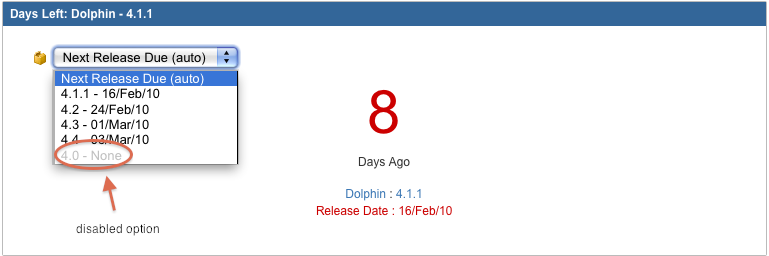
The displayDaysLeftGadget function (as seen below) displays the number of days left in the selected version. The display varies slightly depending on whether or not the version is overdue or yet to be released.
1
2
3
4
5
6
7
8
9
10
11
12
13
14
15
16
17
18
19
20
21
22
23
24
25
26
27
28
29
30
31
32
33
34
35
36
37
38
39
40
41
42
43
44
45
46
47
48
49
50
51
52
53
54
55
56
57
58
59
60
61
62
63
64
65
66
67
68
69
70
71
72
73
74
75
76
77
78
79
80
81var daysLeftDisplay = function(projectVersionList, container)
{
    var projectLink = baseUrl + "/browse/" + currentVersion.owningProject.key
    var versionLink = projectLink + "/fixforversion/" + currentVersion.id

    container.append("<div id ='days-box'/>");
    AJS.$("<div/>").attr("id", "days-value").appendTo("#days-box");
    AJS.$("<div/>").attr("id", "days-text").appendTo("#days-box");
    AJS.$("<div/>").attr("id", "version-link").appendTo("#days-box");

    AJS.$("<a/>").attr({
        href: projectLink,
        id:"projectLink"})
            .appendTo('#version-link');

    AJS.$("#version-link").append(" : ");


    AJS.$("<a/>").attr({
        href: versionLink,
        id: "versionLink"})
            .appendTo("#version-link");

    if (hasVersionWithReleaseDate(projectVersionList))
    {
        //if the currentVersion has no release date find the next version due

        AJS.$("<div/>").attr("id", "days-text").appendTo("#days-box");
        AJS.$("<div/>").attr("id", "version-link").appendTo("#days-box");

        AJS.$("#days-value").append(Math.abs(currentVersion.daysRemaining));

        AJS.$('#projectLink').text(currentVersion.owningProject.name);
        AJS.$('#versionLink').text(currentVersion.name);

        AJS.$('<div/ >').attr('id', 'release-date').text(gadget.getMsg("gadget.days.left.releaseDate") + " : " + currentVersion.releaseDate).appendTo('#version-link')

        if (currentVersion.daysRemaining < 0)
        {
            AJS.$('#days-value').addClass('overdue');
            AJS.$('#release-date').addClass('overdue');

            AJS.$('#days-text').text(gadget.getMsg("gadget.days.left.daysAgo"))

        }
        else if (currentVersion.daysRemaining == 0)
        {
            AJS.$('#days-value').addClass('today');
            AJS.$('#release-date').addClass('today');
            AJS.$('#days-text').addClass('today').text(gadget.getMsg("gadget.days.left.today"))
        }
        else
        {
            AJS.$('#days-value').addClass('future-release');
            AJS.$('#release-date').addClass('future-release');

            AJS.$('#days-text').text(gadget.getMsg("gadget.days.left.daysRemaining"));

        }

    }
    else
    {
        AJS.$('#days-box').empty();

        var futureVersionsWarning = AJS.$("<div />")
                .attr('id', 'no-future-versions-warning')
                .text(" - " + gadget.getMsg("gadget.days.left.noReleaseDatesWarning"))
                .appendTo('#days-box');

        AJS.$("<a/>")
                .attr({
            href: projectLink,
            id:"projectLink"})
                .text(currentVersion.owningProject.name)
                .prependTo(futureVersionsWarning)


    }
};
Your final days-left-gadget.xml file should look as follows:
1 2 3 4 5 6 7 8 9 10 11 12 13 14 15 16 17 18 19 20 21 22 23 24 25 26 27 28 29 30 31 32 33 34 35 36 37 38 39 40 41 42 43 44 45 46 47 48 49 50 51 52 53 54 55 56 57 58 59 60 61 62 63 64 65 66 67 68 69 70 71 72 73 74 75 76 77 78 79 80 81 82 83 84 85 86 87 88 89 90 91 92 93 94 95 96 97 98 99 100 101 102 103 104 105 106 107 108 109 110 111 112 113 114 115 116 117 118 119 120 121 122 123 124 125 126 127 128 129 130 131 132 133 134 135 136 137 138 139 140 141 142 143 144 145 146 147 148 149 150 151 152 153 154 155 156 157 158 159 160 161 162 163 164 165 166 167 168 169 170 171 172 173 174 175 176 177 178 179 180 181 182 183 184 185 186 187 188 189 190 191 192 193 194 195 196 197 198 199 200 201 202 203 204 205 206 207 208 209 210 211 212 213 214 215 216 217 218 219 220 221 222 223 224 225 226 227 228 229 230 231 232 233 234 235 236 237 238 239 240 241 242 243 244 245 246 247 248 249 250 251 252 253 254 255 256 257 258 259 260 261 262 263 264 265 266 267 268 269 270 271 272 273 274 275 276 277 278 279 280 281 282 283 284 285 286 287 288 289 290 291 292 293 294 295 296 297 298 299 300 301 302 303 304 305 306 307 308 309 310 311 312 313 314 315 316 317 318 319 320 321 322 323 324 325 326 327 328 329 330 331 332 333 334 335<?xml version="1.0" encoding="UTF-8" ?> <Module> <ModulePrefs title="__MSG_gadget.days.left.title__" directory_title="__MSG_gadget.days.left.title__" description="__MSG_gadget.days.left.description__"> <Require feature="dynamic-height"/> <Require feature="oauthpopup"/> <Require feature="setprefs"/> <Require feature="settitle"/> <Require feature="views"/> <Optional feature="atlassian.util"/> #oauth #supportedLocales("gadget.common,gadget.days.left") </ModulePrefs> <UserPref name="isConfigured" datatype="hidden" default_value="false"/> <UserPref name="firstTime" datatype="hidden" default_value="true"/> <UserPref name="projectId" datatype="hidden"/> <UserPref name="version" datatype="hidden" default_value="auto"/> <Content type="html"> <![CDATA[ #requireResource("com.atlassian.jira.gadgets:jira-global") #includeResources() <style type="text/css"> #container { padding:15px; } #no-versions-warning { line-height: 1.4; font-size: 12px; } #days-box { text-align: center; } #days-value { text-align: center; font-size: 5em; } #days-text { padding-bottom: 15px; } #version-link { text-align: center; } #no-future-versions-warning { padding: 15px; } .view { padding:0.5em 1em; } .overdue { color: #cc0000; } .future-release { color: #00cc00; } .today { color: #cc0000; } #days-text .today { font-weight: bold; } .icon { padding-top: 3px; padding-right: 3px; } .disabled { color: #C0C0C0; } </style> <script type="text/javascript"> (function () { var gadget = AJS.Gadget({ baseUrl: "__ATLASSIAN_BASE_URL__", useOauth: "/rest/gadget/1.0/currentUser", config: { descriptor: function(args) { var gadget = this; gadgets.window.setTitle("__MSG_gadget.days.left.configTitle__"); var projectPicker = AJS.gadget.fields.projectPicker(gadget, "projectId", args.projectOptions); return { theme : function() { if (gadgets.window.getViewportDimensions().width < 450) { return "gdt top-label"; } else { return "gdt"; } }(), fields: [ projectPicker, AJS.gadget.fields.nowConfigured() ] }; }, args: function() { return [ { key: "projectOptions", ajaxOptions: "/rest/gadget/1.0/filtersAndProjects?showFilters=false" }, ]; }() }, view: { onResizeAdjustHeight: true, enableReload: true, template: function (args) { var versionData = args.versions var currentVersion; var gadget = this; var baseUrl = AJS.$.ajaxSettings.baseUrl; var optionSelected = false; var projectVersionList; if(!versionData) { projectVersionList = null; } else { projectVersionList = AJS.$(args.versions.versionsForProject); } var getContainer = function() { var container = AJS.$("<div/>").attr('id', 'container').appendTo(gadget.getView().empty()); return function() { return container; } }(); var hasVersionWithReleaseDate = function(projectVersionList) { var hasReleaseDate = false; projectVersionList.each(function() { if(this.releaseDate != "") { hasReleaseDate = true; } }); return hasReleaseDate; }; var setTitle = function(projectVersionList) { if(!projectVersionList || !hasVersionWithReleaseDate(projectVersionList)) { gadgets.window.setTitle(gadget.getMsg("gadget.days.left.title")); } else { gadgets.window.setTitle(AJS.format("__MSG_gadget.days.left.subtitle__", currentVersion.owningProject.name, currentVersion.name)); } }; var versionSelector = function(projectVersionList) { var control = AJS.$("<select/>"); AJS.$("<option/>").attr({id:'next-release-option', value:'auto'}).text(gadget.getMsg('gadget.days.left.autoOption')).appendTo(control); projectVersionList.each(function() { var option = AJS.$("<option/>").attr({ value: this.id}); if (this.releaseDate == "") { option.attr("disabled", "true"); option.addClass('disabled'); option.append(this.name + ' - ' + gadget.getMsg('gadget.days.left.noReleaseDate')); } else { option.append(this.name + ' - ' + this.releaseDate); } if (this.id == gadget.getPref("version")) { option.attr({selected: "selected"}); currentVersion = this; optionSelected = true; } control.append(option); }); control.change(function(event) { gadget.savePref("version", AJS.$(this).val()); gadget.showView(true); }); //generate image on side of select bar AJS.$("#selection").append(AJS.$("<img/>").attr({ src: baseUrl + "/images/icons/box_16.gif", height: 16, width: 16, title: gadget.getMsg("gadget.roadmap.status.unreleased"), alt: gadget.getMsg("gadget.roadmap.status.unreleased"), class: "icon" })); AJS.$("#selection").append(control); //try auto select option if no option is selected if(!optionSelected) { AJS.$('#next-release-option').attr({selected: "selected"}); currentVersion = projectVersionList[0]; } }; var daysLeftDisplay = function(projectVersionList, container) { var projectLink = baseUrl + "/browse/" + currentVersion.owningProject.key var versionLink = projectLink + "/fixforversion/" + currentVersion.id container.append("<div id ='days-box'/>"); AJS.$("<div/>").attr("id", "days-value").appendTo("#days-box"); AJS.$("<div/>").attr("id", "days-text").appendTo("#days-box"); AJS.$("<div/>").attr("id", "version-link").appendTo("#days-box"); AJS.$("<a/>").attr({ href: projectLink, id:"projectLink"}) .appendTo('#version-link'); AJS.$("#version-link").append(" : "); AJS.$("<a/>").attr({ href: versionLink, id: "versionLink"}) .appendTo("#version-link"); if(hasVersionWithReleaseDate(projectVersionList)) { //if the currentVersion has no release date find the next version due AJS.$("<div/>").attr("id", "days-text").appendTo("#days-box"); AJS.$("<div/>").attr("id", "version-link").appendTo("#days-box"); AJS.$("#days-value").append(Math.abs(currentVersion.daysRemaining)); AJS.$('#projectLink').text(currentVersion.owningProject.name); AJS.$('#versionLink').text(currentVersion.name); AJS.$('<div/ >').attr('id', 'release-date').text(gadget.getMsg("gadget.days.left.releaseDate") + " : " + currentVersion.releaseDate).appendTo('#version-link') if (currentVersion.daysRemaining < 0) { AJS.$('#days-value').addClass('overdue'); AJS.$('#release-date').addClass('overdue'); AJS.$('#days-text').text(gadget.getMsg("gadget.days.left.daysAgo")) } else if (currentVersion.daysRemaining == 0 ) { AJS.$('#days-value').addClass('today'); AJS.$('#release-date').addClass('today'); AJS.$('#days-text').addClass('today').text(gadget.getMsg("gadget.days.left.today")) } else { AJS.$('#days-value').addClass('future-release'); AJS.$('#release-date').addClass('future-release'); AJS.$('#days-text').text(gadget.getMsg("gadget.days.left.daysRemaining")); } } else { AJS.$('#days-box').empty(); var futureVersionsWarning = AJS.$("<div />") .attr('id', 'no-future-versions-warning') .text(" - " + gadget.getMsg("gadget.days.left.noReleaseDatesWarning")) .appendTo('#days-box'); AJS.$("<a/>") .attr({ href: projectLink, id:"projectLink"}) .text(currentVersion.owningProject.name) .prependTo(futureVersionsWarning) } }; if(!projectVersionList) { var noVersionMsg = gadget.getMsg("gadget.days.left.noVersionWarning"); gadget.getView().empty().append((noVersionMsg)); } else { var container = getContainer().append("<div id='selection'/>"); versionSelector(projectVersionList); daysLeftDisplay(projectVersionList, container); setTitle(projectVersionList); } }, args: [ { key: "versions", ajaxOptions: function () { return { url: "/rest/tutorial-gadget/1.0/days-left-in-iteration/getVersions", data: { projectId : gadgets.util.unescapeString(this.getPref("projectId")), } }; } } ] } }); })(); </script> ]]> </Content> </Module>
Step 10. Build, Install and Run the Plugin
Follow these steps to build and install your plugin, so that you can test your code. If you have not already started the application, start it now:
- Open a command window and go to the plugin root folder (where the
pom.xmlis located). - Run
atlas-run(oratlas-debugif you might want to launch the debugger in your IDE).
From this point onwards, you can use QuickReload to reinstall your plugin behind the scenes as you work, simply by rebuilding your plugin.
1 2<div class="sc-exdmVY viNIl"><section class="sc-kDgGX hYXKZu"><div class="sc-kbGplQ bMMBeQ"><style data-emotion="css snhnyn">.css-snhnyn{display:inline-block;-webkit-flex-shrink:0;-ms-flex-negative:0;flex-shrink:0;line-height:1;}.css-snhnyn >svg{overflow:hidden;pointer-events:none;max-width:100%;max-height:100%;color:var(--icon-primary-color);fill:var(--icon-secondary-color);vertical-align:bottom;}.css-snhnyn >svg stop{stop-color:currentColor;}@media screen and (forced-colors: active){.css-snhnyn >svg{-webkit-filter:grayscale(1);filter:grayscale(1);--icon-primary-color:CanvasText;--icon-secondary-color:Canvas;}}</style><span aria-hidden="true" style="--icon-primary-color:#FF8B00;--icon-secondary-color:#FFFAE6" class="css-snhnyn"><svg width="24" height="24" viewBox="0 0 24 24" role="presentation"><g fill-rule="evenodd"><path d="M12.938 4.967c-.518-.978-1.36-.974-1.876 0L3.938 18.425c-.518.978-.045 1.771 1.057 1.771h14.01c1.102 0 1.573-.797 1.057-1.771L12.938 4.967z" fill="currentColor"/><path d="M12 15a1 1 0 01-1-1V9a1 1 0 012 0v5a1 1 0 01-1 1m0 3a1 1 0 010-2 1 1 0 010 2" fill="inherit"/></g></svg></span></div><div class="sc-cLxPOX fsymmm"><div class="sc-eTyWNx kogaMp">
FastDev and atlas-cli have been deprecated. Please use Automatic Plugin Reinstallation with QuickReload instead.
1 2</div></div></section></div>
To trigger the reinstallation of your plugin:
- Make the changes to your plugin module.
- Open the Developer Toolbar.
- Press the FastDev icon.
The system rebuilds and reloads your plugin:
Use live reload to view real-time updates to templates and other resources:
- Open the Developer Toolbar.
- Press the live reload icon.
The icon starts to revolve indicating it is on. - Edit your project resources.
- Save your changes:
Back in the host application, your plugin displays any user visible changes you make.
Go back to the browser. The updated plugin has been installed into the application, and you can test your changes.
The full instructions are in the SDK guide.
Step 11. Writing Unit Tests
To learn more about writing unit tests check out the tutorial on writing unit tests for your plugin.
Step 12. Test your Updates on your Dashboard
Below are some screenshots of the gadget we have just created in this tutorial. Your final result should look similar to the screenshots shown below.
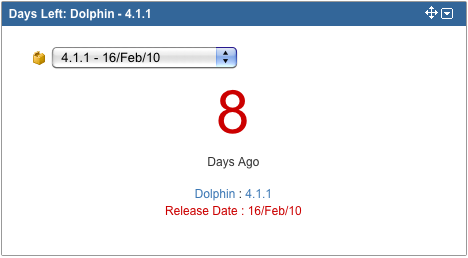
If the selected version has not been released and is overdue the gadget shows the number of days the version is overdue in red. The text below the number is "Days Ago".
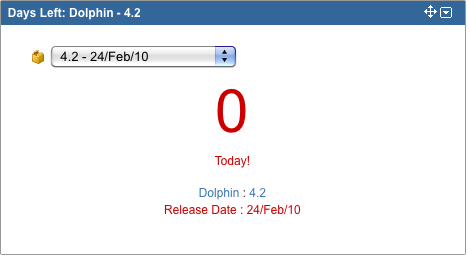
If the selected version is due today then the number displayed then the number of days is displayed in red and the text below the number is "Today!".
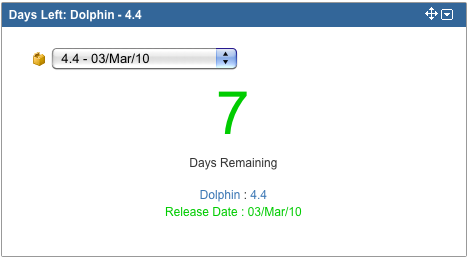
If the selected version is due in the future the number of days remaining is displayed in green and the text below the number is "Days To Go".
If the selected project has no unreleased versions the gadget will appear as follows.

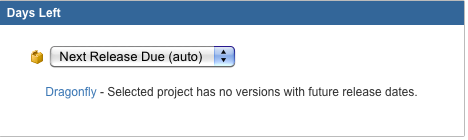
Finally if the selected project has no versions with release dates specified then the gadget will display the following.
Congratulations, you have completed this tutorial.
RELATED TOPICS
Rate this page: