Simplified App Migration
Overview
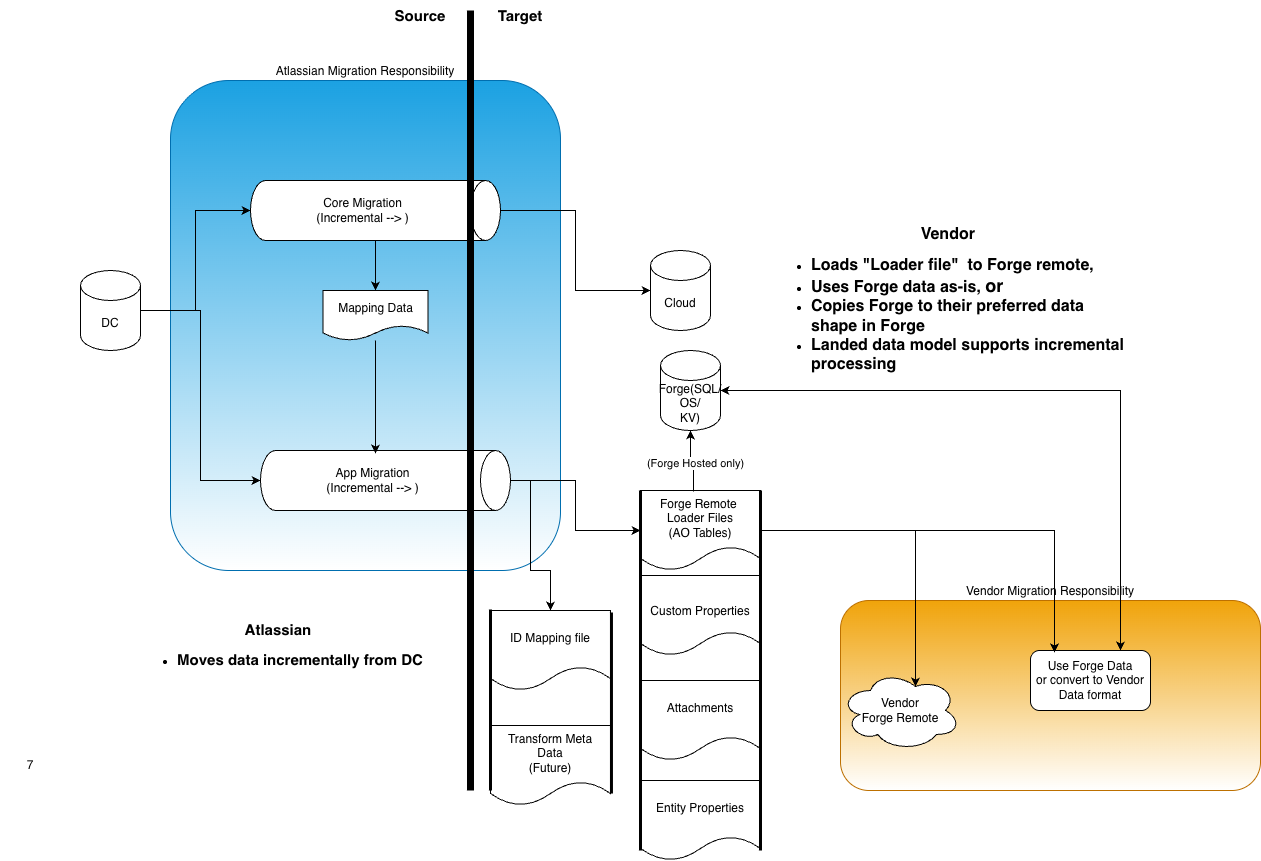
Simplified App Migration reduces the effort required for vendors to build reliable, high-performance migrations. Instead of deploying migration code within Data Center, vendors receive their application's data in a standard format, ready to download and process in their cloud environment.
Atlassian packages the following data specific to each application:
- AO tables (Early Access)
- Attachments (Early Access)
- Custom fields (Early Access)
- Entity properties (Early Access)
- Mapping information (Preview)
This gives vendors control and flexibility over how they consume migration data in their cloud application. Data can be provided incrementally as it becomes available, though vendors may also choose to process it in bulk once all data is ready.
Simplified App Migration is flexible — vendors are not required to adopt the full system. Vendors with existing Data Center migration code can continue to use it while selectively adopting parts of this system, such as consuming Atlassian-packaged data exports or mapping information. This allows vendors to incrementally migrate to the simplified approach at their own pace.
Incremental Migration Orchestration
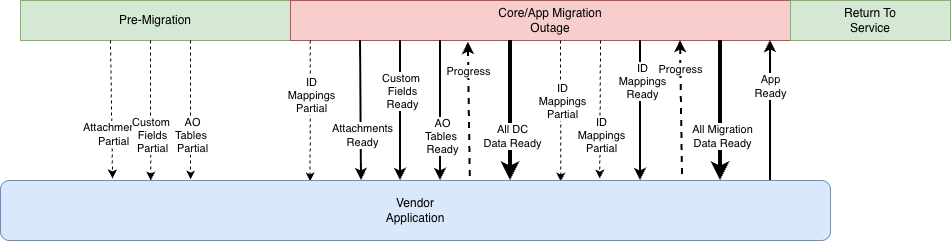
The migration timeline includes three phases: pre-migration, the migration outage, and return to service (when the migrated site becomes available on cloud). The migration platform notifies the vendor when data and metadata are ready to consume. The vendor's application then notifies the migration platform of progress and completion. Vendors can reduce outage time by processing data (such as attachments) earlier, during the pre-migration phase so that the migration is incremental.
The following diagram shows the full timeline for vendor integration, including pre-migration and incremental data consumption:
Minimum Integration
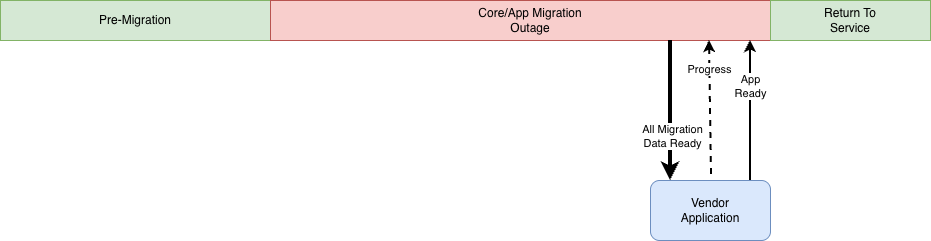
A minimum integration may wait for the All Migration Data Ready event, process the application data, and notify
the migration platform when the app is ready to return to service. Site outage time can still be reduced, as the data
export from Data Center can occur during the pre-migration and core product migration phases.
The following diagram shows the minimum integration timing:
Onboarding to SAM
If you would like to onboard to SAM, please reach out to Atlassian first so that we can enable the functionality for your test sites.
To onboard to Simplified App Migration (SAM), declare a migration:managedExports module in your cloud app's manifest.yml. This module tells the migration platform which categories of data your app wants Atlassian to package and export on its behalf.
Add the following definition to your manifest:
1
2
3
4
5
6
7
8
9
10
11
12
13modules:
  migration:managedExports:
    - key: mapping
      entityTypes: [ "jira:issue", "confluence:page" ]
    - key: binary
      directoryPrefix: [ "assets", "uploads/app" ]
    - key: customFieldValues
      fields:
        - server:
            typeKey: "com.vendor.my-app:my-custom-field-type"
          cloud:
            forgeTypeKey: "my-forge-custom-field-type-module-key"
Each entry under migration:managedExports describes one category of managed export:
| Key | Property | Description |
|---|---|---|
mapping | entityTypes | The list of entity types for which Atlassian should package mapping information (DC-to-cloud identifier mappings). Use the entity type identifiers documented in Mappings, namespaces, and entities, for example jira:issue and confluence:page. |
binary | directoryPrefix | The list of directory prefixes containing binary data (such as attachments and uploaded files) that Atlassian should package for export. Only files under the listed prefixes are included, for example assets and uploads/app under the Atlassian app's home directory (i.e. /jira/home/assets/upload.jpeg and /jira/home/uploads/app/my_doc.pdf). |
customFieldValues | fields | The list of custom field type keys on DC that you support migrating, and the corresponding custom field type module key from your forge manifest to which the DC type key maps. |
You can declare either or both keys depending on which data your app needs. Once the module is deployed, the migration platform will package the requested data and notify your app through the avi:ecosystem.migration:uploaded:event_file_list event when each category becomes available (see the Event Specification).
For details on enabling, running, and consuming the binary export during an EAP migration, see the Binary reference.
Identifying enabled managed exports from your DC app
During a migration, your Data Center app can check which managed exports are enabled by calling getManagedExports() on its migration gateway (available from atlassian-app-cloud-migration-listener 1.8.9). Each export type (mappings, binary, database, custom field values, and entity properties) reports whether it's enabled and what it will export. You can use this to skip any part of your own migration code that Atlassian now covers. See Identify enabled managed exports.
Availability
Since JCMA version 1.13.0, the mapping information exports are available for production migrations and are in preview.
Since JCMA 1.27.0 the custom field values migrations are in preview.
All other data exports (AO tables, Attachments and Custom Fields) are available for early-access testing.
Please reach out to Atlassian to opt-in to these features.
Frequently asked questions
See the Simplified App Migration FAQ for common questions about onboarding, file notifications, identifiers, and scopes.
References
The following references provide detail on the export file format and event structure.
Identify enabled managed exports
Rate this page: