Lifecycle Integration
Learn how Simplified App Migration (SAM) works through its event-driven integration pattern.
Architecture

Your cloud app declares what data it needs in its manifest, subscribes to events, and SAM handles packaging and delivery. The diagram shows the complete flow from migration start to acknowledgment, with the dashed line indicating that the process repeats for incremental updates.
The SAM Lifecycle Integration
SAM follows an event-driven pattern where your cloud app responds to notifications as data becomes available:
1. Declaration Phase (Before Migration)
Your cloud app declares what data it needs in its manifest:
1
2
3
4
5
6
7modules:
  migration:managedExports:
    - key: mapping
      entityTypes: ["jira:issue", "confluence:page"]
    - key: binary
      directoryPrefix: ["uploads/my-app"]
This tells SAM: "I need ID mappings for issues and pages, plus files from uploads/my-app directory."
2. Atlassian Pre-migration Optimisation
For applicable exporters (e.g. Binary), Atlassian begins packaging binary data even before any migration starts
3. Product Migration Starts
When a user initiates a migration using Cloud Migration Assistant, the migration platform:
- Detects your app has SAM exports configured
- Begins packaging data for additional exporters, this may include:
- AO tables
- Binary, if new attachments are uploaded since Atlassian's pre-migration optimisation
- Prepares to notify your cloud app when data is ready
4. Data Packaging
SAM packages your app's data on the Data Center side, to what is known as a "File Group":
- Binary: Packaged before and during product migration
- AO Tables: Packaged during product migration
- Mappings: Packaged after product migration completes
Each export type has its own packaging timeline, producing file groups at different points in the migration time.
5. Notification: avi:ecosystem.migration:uploaded:event_file_list
When data is ready, SAM sends an avi:ecosystem.migration:uploaded:event_file_list webhook to your cloud app:
1
2
3
4
5
6
7
8
9{
  "eventType": "avi:ecosystem.migration:uploaded:event_file_list",
  "key": "file-list-abc123",
  "label": "MAPPINGS",
  "isComplete": false,
  "transferId": "...",
  "movementDetails": {...}
}
Key fields:
key: Identifier to fetch the file listinglabel: Which export type (MAPPINGS, BINARY, DATABASE, etc.)isComplete: Whether this exporter's data is complete for this label
See the Event Specification for complete payload details.
6. Download File Listing
Your app uses the key to download a file listing:
1
2
3
4
5
6
7
8
9
10
11
12
13
14
15
16
17
18
19
20// Forge remote example
// Step 1: Get presigned URL for the file listing
const response = await fetch(
  'https://api.atlassian.com/app/migration/forge/v1/file-listing/download-url',
  {
    method: 'POST',
    headers: {
      'Authorization': `Bearer ${accessToken}`,
      'Content-Type': 'application/json'
    },
    body: JSON.stringify({ fileKey: 'file-list-abc123' })
  }
);

const { url } = await response.json();

// Step 2: Download and stream the file listing (JSONL format)
const listingResponse = await fetch(url);
// Process line by line - don't load entire file into memory
The file listing is a JSONL file containing metadata about event files.
File listings can be up to 5GB. Stream the JSONL file line-by-line instead of loading it entirely into memory with .text() or .json(). See Performance Considerations for streaming examples.
7. Process Event Files
Download and process each event file from the listing. Event files contain either:
- Direct data - The actual data you need (e.g., mappings records with DC/cloud IDs)
- Metadata/pointers - References to download the actual data separately (e.g., binary file metadata with
fileIdto fetch bytes)
After processing, acknowledge each event file.
8. Repeat for Incremental Updates
SAM may send multiple avi:ecosystem.migration:uploaded:event_file_list notifications as more data becomes available. Your app processes each notification incrementally.
File List Events
The avi:ecosystem.migration:uploaded:event_file_list notification is the core of SAM's event-driven model. Understanding how it works is essential for integration.
What is a File Listing?
A file listing is a JSONL file that contains metadata about event files ready for download.
Example file listing (JSONL format):
1
2
3
4{"fileId":"event_file/mapping-123","label":"MAPPINGS","createdAt":"2026-10-12T10:00:00Z"}
{"fileId":"event_file/mapping-124","label":"MAPPINGS","createdAt":"2026-10-12T10:05:00Z"}
{"fileId":"event_file/mapping-125","label":"MAPPINGS","createdAt":"2026-10-12T10:10:00Z"}
Each line describes one event file that's ready to download.
What's inside event files:
- For mappings/AO tables: Direct data records (e.g., JSON objects with DC→cloud ID mappings)
- For binary files: Metadata records with
fileIdpointers - you fetch the actual bytes separately
When Do You Receive File List Events?
You receive an avi:ecosystem.migration:uploaded:event_file_list notification when:
- Initial data is ready: First batch of event files for an export type
- More data arrives: Additional event files become available (incremental)
- Data is updated: New versions of previously sent files
File listings are additive - Each notification's file listing includes event files from previous notifications. This means if you miss an earlier notification, later notifications still contain those event files. See File Listings Are Additive for details.
Example timeline:
1
2
3
4
510:00 - avi:ecosystem.migration:uploaded:event_file_list (MAPPINGS, 3 files)
10:15 - avi:ecosystem.migration:uploaded:event_file_list (BINARY, 5 files)
10:30 - avi:ecosystem.migration:uploaded:event_file_list (MAPPINGS, 2 more files) ← incremental
10:45 - avi:ecosystem.migration:uploaded:event_file_list (BINARY, 8 more files) ← incremental
File Listing Structure
Notification payload (full specification):
1
2
3
4
5
6
7
8
9
10
11
12{
  "eventType": "avi:ecosystem.migration:uploaded:event_file_list",
  "key": "file-list-abc123",           // ← Use to download listing
  "label": "MAPPINGS",                 // ← Export type
  "isComplete": false,                 // ← More MAPPINGS data coming?
  "transferId": "transfer-xyz",
  "movementDetails": {
    "appDataMovementId": "movement-456",
    "migrationDetails": {...}
  }
}
Steps to process:
- Extract the key:
key: "file-list-abc123" - Request presigned URL:
1 2 3 4 5 6 7 8 9 10 11 12 13
const response = await fetch( 'https://api.atlassian.com/app/migration/forge/v1/file-listing/download-url', { method: 'POST', headers: { 'Authorization': `Bearer ${accessToken}`, 'Content-Type': 'application/json' }, body: JSON.stringify({ fileKey: event.key }) } ); const { url } = await response.json(); - Download the listing: GET the presigned URL and stream it (don't load entire 5GB file into memory)
- Parse JSONL: Each line is metadata for one event file
- Download event files: Use event file IDs to fetch actual data
File Listings Are Additive
Important: Later file listings include event files from previous notifications.
1
2
3
4
5
6
7
8Notification 1: Listing contains [file-1, file-2, file-3]
Notification 2: Listing contains [file-1, file-2, file-3, file-4, file-5]
                                  ^^^^^^^^^^^^^^^^^^^^^^  ^^^^^^^^^^^^
                                  Previously sent         New files
Notification 3: Listing contains [file-1, file-2, file-3, file-4, file-5, file-6]
                                  ^^^^^^^^^^^^^^^^^^^^^^^^^^^^^^^^^^^^  ^^^^^^
                                  Previously sent                       New files
Why this matters:
- Process at your own pace - No need to worry about missing data if your app was temporarily down
- Track processed files - Your app must track which files it's already processed to avoid duplicate imports
Binary exporter produces incremental diffs:
- First event files: Snapshot of all existing files at migration start
- Subsequent event files: Incremental changes (new, modified, deleted files)
- Even if you miss early notifications, later listings include all previous event file IDs
Store processed file IDs in your database to persist across restarts and ensure idempotency:
1
2
3
4
5
6
7
8
9
10
11
12
13
14
15
16
17
18
19
20
21
22
23
24async function handleFileListUploaded(event) {
  const listing = await downloadFileListing(event.key);

  for (const eventFile of listing) {
    // Check database if already processed
    const alreadyProcessed = await db.query(
      'SELECT 1 FROM processed_files WHERE file_id = $1',
      [eventFile.fileId]
    );

    if (alreadyProcessed.rows.length > 0) {
      continue; // Skip already processed file
    }

    await processEventFile(eventFile);

    // Mark as processed in database
    await db.query(
      'INSERT INTO processed_files (file_id, processed_at) VALUES ($1, NOW())',
      [eventFile.fileId]
    );
  }
}
Don't use in-memory tracking (e.g., Set or Map) - your app may restart during migration, losing track of processed files and causing duplicate imports.
Labels: Identifying Export Types
The label field identifies which export type the notification is for:
| Label | Export Type |
|---|---|
MAPPINGS | DC→Cloud ID mappings |
BINARY | File attachments |
DATABASE | Active Objects data |
Learn more about each export type in Data Exporters.
Your handler should check the label:
1
2
3
4
5
6
7
8
9
10
11
12
13
14
15
16async function handleFileListUploaded(event) {
  switch (event.label) {
    case 'MAPPINGS':
      await processMappings(event);
      break;
    case 'BINARY':
      await processBinary(event);
      break;
    case 'DATABASE':
      await processAOTables(event);
      break;
    default:
      console.warn(`Unknown label: ${event.label}`);
  }
}
When to Start Processing
Process data as soon as you receive it.
1
2
3
4
5
6
7
8
9// Process immediately when data arrives
async function handleFileListUploaded(event) {
  await processData(event);

  if (event.isComplete) {
    console.log(`${event.label} export complete - no more data for this label`);
  }
}
The isComplete flag tells you when this exporter is done sending data. Process data as soon as you receive it - don't wait for completion.
Event-Driven Data Delivery
SAM uses an event-driven model to notify your cloud app when data is ready:
Event Files and Listings
Data is delivered in two tiers:
- File Listing: Contains metadata about all event files (one per notification)
- Event Files: Contain either direct data or pointers to data (many per listing)
- Direct data: Mappings, AO tables contain actual records
- Pointers: Binary files contain metadata with
fileId- download bytes separately
This allows incremental processing - you can start importing before all files are ready.
Example flow:
1
2
3
4
5
6
7
8
9
10
11
12Notification 1: File listing with 10 event files
→ Download listing
→ Download 10 event files
→ Process data
→ Acknowledge

Notification 2: File listing with 5 more event files (incremental)
→ Download listing
→ Download 5 event files
→ Process data
→ Acknowledge
Labels
Each notification has a label identifying the export type:
MAPPINGS- ID mappingsBINARY- File attachmentsDATABASE- Active Objects data
Learn more about each exporter in Data Exporters.
Your handler should check the label and route to appropriate processing logic.
Timing and Availability
Different export types become available at different times during the migration:
During Migration
Binary, AO Tables - Available during the migration outage
- Allows processing while product migration is running
- Can reduce total outage time
After Product Migration
Mappings - Available after product migration completes
- DC→Cloud ID mappings only exist once entities are migrated
- Cannot be processed until product is migrated
Migration Timeline
The migration includes three phases:
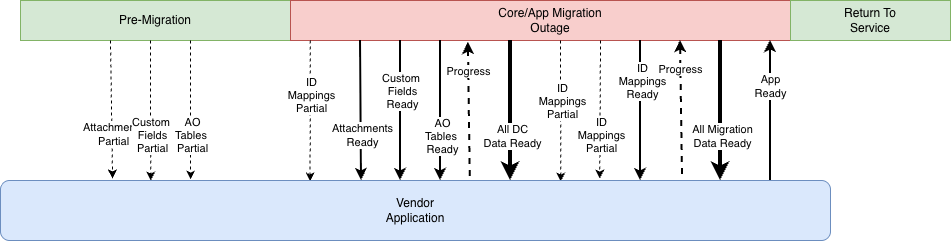
Pre-migration: Setup, planning, data preparation
Migration outage: Product migration + app data migration
- Binary/AO data becomes available during this phase
- Apps can process incrementally to reduce outage
Return to service: Site available, mappings delivered
- Mappings become available after product migration
- Final app data import happens here
Minimum Integration
A minimum integration waits for all data before processing:
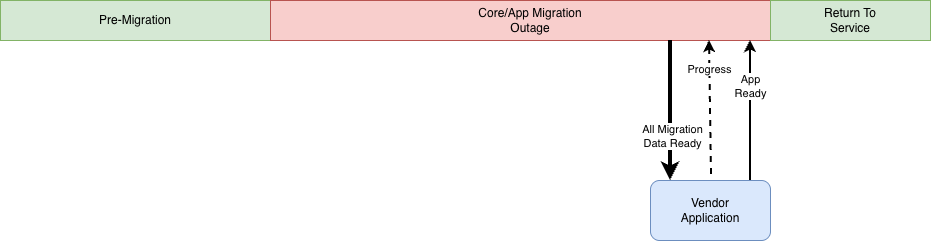
This is simpler but may result in longer outage times.
The isComplete Flag
The isComplete field in event notifications indicates whether the data export for this label is complete.
Important: It applies to the specific exporter that sent the notification, not all exporters.
What isComplete Means
1
2
3
4
5
6
7
8
9
10
11
12
13
14
15
16
17
18// First BINARY notification - more binary data coming
{
  "label": "BINARY",
  "isComplete": false  // More BINARY data will be sent
}

// Final BINARY notification - all binary data sent
{
  "label": "BINARY",
  "isComplete": true   // No more BINARY data for this migration
}

// MAPPINGS notification - mappings are complete
{
  "label": "MAPPINGS",
  "isComplete": true   // All MAPPINGS data sent
}
Understanding Completion
Each exporter sends notifications until its data is complete:
isComplete: false- More notifications for this label are comingisComplete: true- This is the final notification for this label
Example: If you enable BINARY and MAPPINGS exporters:
- You'll receive BINARY notifications until the last one has
isComplete: true - You'll receive MAPPINGS notifications until the last one has
isComplete: true - These complete independently
Best Practice
Process data as it arrives, track completion per label:
1
2
3
4
5
6
7
8
9
10
11
12
13
14
15
16
17
18
19
20
21
22
23
24
25
26
27
28
29
30
31
32
33
34
35
36
37
38// Track which exporters have completed
const completedExporters = new Set();

if (event.isComplete) {
  completedExporters.add(event.label);
  console.log(`${event.label} export complete`);
}

// Process the data regardless of completion status
await processEventFiles(event);

## Incremental Processing

SAM supports incremental data delivery - you may receive multiple notifications for the same export type as data becomes available.


 <div class="sc-exdmVY viNIl"><section class="sc-kDgGX eKHQLf"><div class="sc-kbGplQ bMMBeQ"><style data-emotion="css snhnyn">.css-snhnyn{display:inline-block;-webkit-flex-shrink:0;-ms-flex-negative:0;flex-shrink:0;line-height:1;}.css-snhnyn >svg{overflow:hidden;pointer-events:none;max-width:100%;max-height:100%;color:var(--icon-primary-color);fill:var(--icon-secondary-color);vertical-align:bottom;}.css-snhnyn >svg stop{stop-color:currentColor;}@media screen and (forced-colors: active){.css-snhnyn >svg{-webkit-filter:grayscale(1);filter:grayscale(1);--icon-primary-color:CanvasText;--icon-secondary-color:Canvas;}}</style><span aria-hidden="true" style="--icon-primary-color:#0747A6;--icon-secondary-color:#DEEBFF" class="css-snhnyn"><svg width="24" height="24" viewBox="0 0 24 24" role="presentation"><g fill-rule="evenodd"><path d="M2 12c0 5.523 4.477 10 10 10s10-4.477 10-10S17.523 2 12 2 2 6.477 2 12z" fill="currentColor"/><rect fill="inherit" x="11" y="10" width="2" height="7" rx="1"/><circle fill="inherit" cx="12" cy="8" r="1"/></g></svg></span></div><div class="sc-cLxPOX fsymmm"><div class="sc-eTyWNx kogaMp">

**File listings are additive** - Later notifications include event files from previous notifications. See [File Listings Are Additive](#file-listings-are-additive) for details. This means your integration must be idempotent - handle seeing the same file ID multiple times.

 </div></div></section></div>

### Transaction Sequences

Event files include `TXN_SEQUENCE` to track updates:

```json
{
  "filepath": "uploads/my-app/document.pdf",
  "TXN_SEQUENCE": 1
}

// Later update
{
  "filepath": "uploads/my-app/document.pdf",
  "TXN_SEQUENCE": 2  // Newer version
}
Use TXN_SEQUENCE to:
- Skip records you've already processed at a higher sequence
- Identify the latest version of a record
- Handle incremental updates correctly
1
2
3
4
5
6
7
8
9
10
11async function shouldProcessRecord(record) {
  const lastProcessed = await getLastSequence(record.filepath);

  // Skip if we've seen a newer version
  if (record.TXN_SEQUENCE <= lastProcessed) {
    return false;
  }

  return true;
}
Deletions
Some export types (like Binary) include deletion records:
1
2
3
4
5
6{
  "filepath": "uploads/my-app/deleted-file.pdf",
  "DELETED": true,
  "TXN_SEQUENCE": 5
}
Your app should handle deletions appropriately (remove from storage, mark as deleted, etc.).
Processing Event Files
When you receive an avi:ecosystem.migration:uploaded:event_file_list notification, follow these steps to process the event files efficiently.
Step 1: Stream the File Listing
File listings can contain 10k-100k+ entries (especially for binary files), so stream them:
1
2
3
4
5
6
7
8
9
10
11
12
13
14
15
16
17
18
19
20
21
22
23
24
25
26
27
28
29
30
31
32
33
34
35
36
37async function handleFileListUploaded(event) {
  // Get presigned URL for file listing
  const listingUrl = await getFileListingUrl(event.key);
  const response = await fetch(listingUrl);

  // Stream and collect event file IDs
  const eventFileIds = await streamFileListing(response);

  // Process event files in batches
  await processEventFilesBatch(eventFileIds);
}

async function streamFileListing(response) {
  const reader = response.body.getReader();
  const decoder = new TextDecoder();
  let buffer = '';
  const eventFileIds = [];

  while (true) {
    const { done, value } = await reader.read();
    if (done) break;

    buffer += decoder.decode(value, { stream: true });
    const lines = buffer.split('\n');
    buffer = lines.pop(); // Keep incomplete line

    for (const line of lines) {
      if (line.trim()) {
        const eventFile = JSON.parse(line);
        eventFileIds.push(eventFile.fileId);
      }
    }
  }

  return eventFileIds;
}
Step 2: Batch Fetch Event File URLs
Fetch URLs for event files in batches of 100 (API limit):
1
2
3
4
5
6
7
8
9
10
11
12
13
14
15
16
17
18
19
20
21
22
23
24
25
26
27
28
29async function processEventFilesBatch(eventFileIds) {
  const BATCH_SIZE = 100;

  for (let i = 0; i < eventFileIds.length; i += BATCH_SIZE) {
    const batchIds = eventFileIds.slice(i, i + BATCH_SIZE);

    // Batch fetch URLs (up to 100 IDs per request)
    const response = await fetch(
      'https://api.atlassian.com/app/migration/forge/v1/event-file/urls',
      {
        method: 'POST',
        headers: {
          'Authorization': `Bearer ${accessToken}`,
          'Content-Type': 'application/json'
        },
        body: JSON.stringify({ fileIds: batchIds })
      }
    );

    const { urls } = await response.json();
    // urls: [{ fileId: "...", url: "https://..." }, ...]

    // Process event files
    await Promise.all(
      urls.map(({ fileId, url }) => downloadAndProcessEventFile(fileId, url))
    );
  }
}
Step 3: Download and Process Event Files
Download each event file and process its contents:
1
2
3
4
5
6
7
8
9
10
11
12
13
14
15
16
17
18
19
20
21
22
23
24
25
26
27
28
29
30
31
32
33
34
35
36
37async function downloadAndProcessEventFile(fileId, presignedUrl) {
  // Download event file
  const response = await fetch(presignedUrl);

  // Parse event file (JSONL format)
  const reader = response.body.getReader();
  const decoder = new TextDecoder();
  let buffer = '';
  let firstLine = true;

  while (true) {
    const { done, value } = await reader.read();
    if (done) break;

    buffer += decoder.decode(value, { stream: true });
    const lines = buffer.split('\n');
    buffer = lines.pop();

    for (const line of lines) {
      if (!line.trim()) continue;

      if (firstLine) {
        // First line is metadata header - skip
        firstLine = false;
        continue;
      }

      // Process data record
      const record = JSON.parse(line);
      await importRecord(record);
    }
  }

  // Acknowledge processing
  await acknowledgeEventFile(fileId, movementDetails.appDataMovementId, 'SUCCESS');
}
Handling Multiple Notifications
SAM may send multiple avi:ecosystem.migration:uploaded:event_file_list notifications. Choose your approach:
Approach 1: Process Incrementally (Recommended)
Process each notification as it arrives for faster migrations:
1
2
3
4
5async function handleFileListUploaded(event) {
  // Process immediately - don't wait for isComplete
  await processFileListing(event);
}
Pros: Faster migrations, reduced outage Cons: Must handle duplicate files (use database tracking)
Approach 2: Bulk Processing
Wait for all notifications before processing:
1
2
3
4
5
6
7
8
9
10
11
12async function handleFileListUploaded(event) {
  // Persist file listing IDs to database
  await persistEventFileIds(event);

  if (!event.isComplete) {
    return; // Wait for more data
  }

  // All data received - process everything
  await processAllPendingFiles();
}
Pros: Simple logic Cons: Longer migration outage (waits for all data)
Acknowledgment
After processing each event file, acknowledge it to SAM (acknowledgment specification):
1
2
3
4
5
6await acknowledgeEventFile(
  eventFile.fileId,
  movementDetails.appDataMovementId,
  'SUCCESS'  // or 'FAILED'
);
Acknowledgment semantics:
SUCCESS: File processed and data durably storedFAILED: Unrecoverable error, fail the entire migration
Important:
- Only acknowledge after data is committed to database/storage
- Each acknowledgment resets the 15-minute inactivity timeout
- Don't acknowledge on transient errors - retry instead
FAILEDstatus fails the migration immediately
Performance Considerations
Batch API Calls
Always batch fetch event file URLs (up to 100 per request). See Step 2: Batch Fetch Event File URLs for complete example.
1
2
3
4
5
6
7
8
9
10
11
12// Bad - 100 API calls (one per event file)
for (const eventFile of fileListing) {
  const url = await getEventFileUrl(eventFile.fileId);
}

// Good - 1 API call for 100 event files
const fileIds = fileListing.map(ef => ef.fileId).slice(0, 100);
const response = await fetch('/event-file/urls', {
  method: 'POST',
  body: JSON.stringify({ fileIds })
});
Process in Parallel
Download and import multiple files concurrently:
1
2
3
4
5
6
7
8
9
10
11
12// Bad - sequential
for (const eventFile of fileListing) {
  await processEventFile(eventFile);
}

// Good - parallel with concurrency limit
const CONCURRENCY = 10;
for (let i = 0; i < fileListing.length; i += CONCURRENCY) {
  const batch = fileListing.slice(i, i + CONCURRENCY);
  await Promise.all(batch.map(ef => processEventFile(ef)));
}
Stream Large Files
File listings can be up to 5GB, so stream them line-by-line. See Step 1: Stream the File Listing and Step 3: Download and Process Event Files for complete examples.
1
2
3
4
5
6
7
8
9
10
11
12
13
14
15
16
17
18
19
20
21
22
23
24
25
26
27
28
29
30
31
32
33
34
35
36
37
38// Bad - loads entire 5GB file into memory
const text = await response.text();
const lines = text.split('\n');
for (const line of lines) {
  const eventFile = JSON.parse(line);
  await processEventFile(eventFile);
}

// Good - streams line by line
const reader = response.body.getReader();
const decoder = new TextDecoder();
let buffer = '';

while (true) {
  const { done, value } = await reader.read();
  if (done) break;

  buffer += decoder.decode(value, { stream: true });
  const lines = buffer.split('\n');

  // Keep incomplete line in buffer
  buffer = lines.pop();

  // Process complete lines
  for (const line of lines) {
    if (line.trim()) {
      const eventFile = JSON.parse(line);
      await processEventFile(eventFile);
    }
  }
}

// Process remaining buffer
if (buffer.trim()) {
  const eventFile = JSON.parse(buffer);
  await processEventFile(eventFile);
}
Next Steps
- Data Exporters - Learn about the types of data SAM can export
- Quick Start - See these concepts in action
- Event Specification - Full event details
Rate this page: